Smart Office

Telarus Joins EMC For SAN & NAS

Telarus, the national infrastructure-based service provider, has announced it has become a member of the EMC Authorised Services Network (ASN) and has joined the EMC Velocity Partner Program.

As an EMC Velocity Partner, Telarus will now be able to promote and sell Storage Area Network (SAN) and Network Attached Storage (NAS) solutions based on EMC’s leading CLARiiON storage systems and software.

 According to EMC, the CLARiiON platform will become “a strategically important part of Telarus’ expanding line of hosting and colocation products. Telarus will be able to include storage, backup and replication capabilities within hosting and disaster recovery solutions for clients”.

Jules Rumsey, Managing Director at Telarus said, “Our team will now be able to leverage advanced features in EMC’s hardware and software platforms coupled with the coverage and performance of our national MPLS network to provide industry leading hosting and disaster recovery solutions for SME and Enterprise customers”.

 “Telarus has shown incredible initiative in gearing up to meet growing market demand with EMC products and solutions,” said David Henderson, ANZ General Manager, Partner and Alliances at EMC.

Telarus said it is also currently working closely with EMC to develop a range of market leading managed service offerings based on the EMC CLARiiON platform and a number of EMC’s software products.

QuickBooks Goes Online For The iPhone

According to macworld.com, QuickBooks Online for the iPhone has been released, which allows the viewing of all financial information from iPhone’s Safari web browser.


Click to enlarge

Intuit’s latest web-based service for tracking expenses, paying bills, and creating invoices, QuickBooks Online is designed for “storing information on bank accounts, employee information, customers and vendors”, according to the Macworld report.
Moreover, a Profit & Loss section for viewing of income and expenses for multiple time periods, such as the last month, quarter, year, or month-, quarter-, and year-to-date is also available, the report notes.

The QuickBooks Online web interface is able to integrate with several of the iPhone’s other applications, like the Maps application, although the report also mentions that the editing of information via the iPhone interface is not possible.

However, one potential hiccup is that “QuickBooks Online requires a Windows-based machine running Internet Explorer”, but Intuit has said that the company is “working on making the service Mac-friendly. In the meantime, the service is limited to those Mac users who also have PCs, or use Windows on solutions such as Boot Camp and virtualization products like Parallels Desktop and VMWare Fusion”, according to macworld.com.

Ingram Micro & Dell Warn Of IT Meltdown

This morning two of the worlds biggest computer vendors, Dell and Ingram Micro, are warning that demand for IT products was weakening, which in turn would hurt both corporate and consumer spending.


Click to enlarge

“It sounds like things are really starting to slip everywhere. Both consumer and corporate end-demand are slowing. The question is how long it lasts,” said Cross Research analyst Shannon Cross to the UK’s Guardian newspaper.

And Dell said it seeing a further softening in global end-user demand, with that demand “not rebounding in September as it normally did”.

As for Ingram Micro, the world’s biggest computer products distributor, it has cut its third-quarter profit and revenue outlook, saying economic softness in July and August was continuing into September and “pressuring operating margins”, according to the Guardian report.

In Australia, according to one local IT vendor, the effects of a slowdown have been felt for some time now, regardless of what else is happening on Wall Street.

Steve Rust, the MD of Panasonic noted that, “due to the continually rising interest rates, corporate IT spend has been down for a while”.


“We have already seen the impact on both the consumer and SME market from this, however, whether the events from New York will have a further impact on IT spending is hard to tell. We will just have to wait and see”, noted Rust.

However in an interesting side note, Rust pointed out that companies such Panasonic that sell consumer items such as TV’s may well be buffered from the full effect of an IT meltdown since there is a “high demand for Flat Panels TV’s in this country, along with other AV products, especially leading up to Christmas”, which he notes” which may nullify the downward sales figures somewhat.

But not all IT vendors are putting such a positive spin on events. For example, storage vendor Seagate has also sounded the warning bells by noting that, “poor visibility about where the economy was heading was causing people to pull back spending plans”.

And adding to the IT industry’s woes was analysts firm Forrester Research, which forecast that tech spending in the US will grow at 6.1 per cent, down from its previous forecast estimate of 9.4 per cent.

Samsung Aims For Control Of Retail Display Market

Samsung says it has launched 20 new large format display monitors for business and retail needs and claims it will to double its global Large Format Display (LFD) sales to almost US$480 million this year by focusing more on the Business Display Solutions market.


Click to enlarge

The company has pointed to the rapidly growing Business Display Solution market as the key growth driver for its monitor business and says it aims to “double its global LFD sales to US$479 million this year”, according to reports.

Some analysts point out that Samsung has already built up a good head of steam in the Large Format Display segment, with last year achieving close to 90 per cent growth to reach nearly US$277 million sales globally.

So with these latest additions to its LFD line-up, Samsung says it now has one of the industry’s widest range of LFD monitors, “incorporating cutting-edge design, built-in network solutions with enhanced touch screen interactivity and connectivity capabilities”.

And although figures for Asia-Pacific are a bit sketchy, in the US for example, industry research indicates that by the year 2009 there will be over one million digital signs and the North American market is on track to install nearly 135 million locations over the next 10 years, many of which will incorporate LFD technology.

Acer Iconia Tab W500: An Icon In The Making?

It has been panned by some, and lauded by others. But does the 10.1 inch Windows powered Iconia Tab W500 have what it takes to stand out from the increasingly crowded space that is the tablet market?
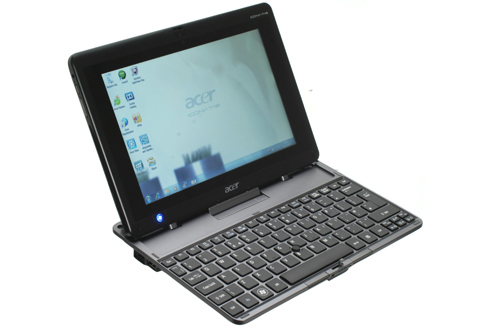
The Acer Iconia W500 is in several ways much like better-known tablets such as the Motorola Xoom and Samsung Galaxy Tab 10.1. It has a 10.1in screen, comes with a wedge of internal flash memory and is primarily controlled using the capacitive touchscreen.

The great big, gaping difference between this tablet and an Android-powered alternative is that it runs Windows 7, as suggested by the physical Windows button on its front. In order to mitigate for the truth that Windows isn’t designed for use with a touchscreen, Acer has produced a dedicated keyboard dock for the Acer Iconia W500 that adds a full-size ‘board and a rubber nipple mouse cursor controller, complete with the standard mouse buttons.

This dock also adds two USB slots and an Ethernet port, but all the basic physical connectivity options you should want are included on the tablet itself. There are two full-size USB ports, HDMI output, 3.5mm headphone jack, SD card slot and SIM slot. Bucking the tablet trend, the miniature equivalents aren’t used here. Like a McDonalds’s fan with no self control, the Iconia W500 opts for super size every time, with full-size SD card and HDMI connectors on-board.

This dedication to the full fat option helps to make sure the Acer Iconia W500 is ready for most eventualities without the need for many extra adapters or cables. However, it doesn’t help make it a slender contender. At 16mm thick and weighing 970g it is chunkier and heavier than most non-Windows alternatives. Try using it one-handed for any length of time and you’ll either develop forearms of steel or RSI. Even with two hands involved, it feels much heavier than the original iPad – which is already significantly heavier than the current iPad 2.

All that puppy fat isn’t there without reason though. As well as the extra connectivity, the Acer Iconia W500 offers 2GB of RAM and an AMD C-50, which packs-in an AMD 6250 graphics card on top of Tegra 2-beating CPU performance. Of course, Windows 7 needs this extra power, being a “full” OS rather than an evolution of a simpler smartphone OS like Android Honeycomb.

As necessary a compromise as the extra bulk and weight of the Iconia W500 may be, it would put us off thinking of the W500 as any more portable than a netbook or ultra-portable laptop. It’s just a bit too heavy for comfort, especially when its all-plastic outer construction doesn’t leave you feeling as if you’re grasping hold of a truly desirable piece of kit. It’s hard to fall in love with, so having it by your side never felt to us like an imperative.


A key bullet-point in the argument that the Acer Iconia W500 is a viable netbook-replacement is its keyboard accessory. It offers full-size keys plus a rubber trackpoint instead of a mouse trackpad. However, it’s not quite the seamless solution we were hoping for.

The tablet slots into this dock with the aid of the W500’s bottom USB port and two stabilising metal prongs that are shoved into the tablet’s backside. Once connected up, this join is stable, but something doesn’t quite feel right.

As there’s no trackpad, the keyboard feels oddly stunted even though its keys are fully-grown – not unlike the official keyboard dock for the first Apple iPad.

The most pressing problem, though, is the way the dock mechanism works. Rather than having a hinge into which the tablet sits, which then allows you to tilt the tablet back and forth just like it were the screen on a laptop (as on the Asus Eee Pad Transformer), the W500 has a fixed dock. The mounting points on the dock do fold flat into the body of the dock when not in use but the tablet has to be removed for this to work. Fold the dock’s mechanism all the way back in and the tablet and dock can be sandwiched on top of each other, but compared with a simple laptop hinge, it’s hopelessly clumsy.

Two magnets at the back keep one half of the W500 in place when arranged like this, while a plastic hook secures the other half. Under a small amount of pressure, this works just fine, but give the magnet-secured back-end more than a nudge and it’ll separate, threatening to take the weedy plastic hook with it. Indeed it’s quite easy to have one or other of the parts go flying if you’re not careful how you prize them apart. You can reduce the risk of damage to a minimum by grabbing a case for the tablet but nonetheless the whole solution feels like a bit of a fudge.

The chiclet-style keyboard is comfortable to type on – much more so than the iffy virtual keyboard Windows 7 has on offer – but its built quality is unremarkable. It feels plasticy and toy-like, giving us some concern about how long its rotating dock parts will last.

The rubber mouse nipple is also an acquired taste. It works rather like a tiny analogue joystick – nudge it lightly and the cursor moves slowly, press with more force and it’ll move quickly. It takes a little getting used to, but is surprisingly refined in its execution, given it is a tiny rubber blip nestled between a few keys in the keyboard. We found its placement, relative to the two mouse buttons, harder to get used to though.

Using your middle finger to drive the miniature rubber flight stick, you can keep your first and third fingers on the two buttons, but it doesn’t feel comfortable and any other arrangement feels slower and clumsier than the traditional mouse/trackpad setup.


The keyboard of the Acer Iconia W500 is largely a failure, even if it is comfortable to type on. However, it’s a necessary one in our book as Windows 7 is simply not usable with the tablet alone.

Reasons why barely need to be introduced – Windows 7 was designed with desktop computers and laptops in mind, which are almost universally equipped with keyboards and mice or trackpads. Without the keyboard dock in-place, all the Acer Iconia W500 has to rely on are its 10in capacitive touchscreen and a physical Windows button that brings-up the Start menu. Single taps on the touchscreen act as left-button clicks while a longer press works like a right mouse button click.

The touchscreen itself is responsive and accurate, but there’s lag within the software that makes the Acer Iconia W500 less responsive in use than its dual-core Android rivals. There’s a split-second gap between when the touchscreen is pressed and when it registers within Windows’s “home” screen, and while touchscreen-oriented features like multi-touch zooming are available in IE and other browsers, they’re not fast.

Zooming isn’t smooth, demonstrating that while the AMD C-50 processor may be nippy among its tablet peers, it’s a slouch compared with similarly-priced Windows laptops. However, it is largely down to the Windows software and how out of place it feels with a touchscreen rather than being solely the processor’s fault. Basic navigation around the Windows interface is fairly quick though, down in part to the 2GB of RAM – the minimum required to get decent performance out of a standard install of Windows 7.

Interface quirks also continually slow down progress. The virtual keyboard is particularly annoying. Tap on a text entry box and a keyboard icon will appear next to the cursor. You then need to tap this icon to bring up the virtual keyboard. In typical Windows fashion, it’s not a standard window that fits into what’s currently on-screen – it can be docked or moved about. Dismiss it and it’ll hide away at the side of the screen, needing to be dragged back on-stage when required.

While some may appreciate this flexibility, it’s not conducive to doing things snappily in real-world usage. The line between plenty of flexibility and too much faffing is a thin one, and the Iconia W500 often finds itself on the wrong side.

Skipping between using the Acer Iconia W500 and the Asus Eee Pad Transformer, a hybrid Android tablet in the same cost ball-park, it’s hard not to be drawn away from the Acer. It’s big, it’s clunky and using it feels comparatively clumsy. However, it’s important not to forget the supreme versatility of Windows. You can install virtually anything you like on it, just as you would with a laptop, and the two USB slots let you plug in all sorts of control peripherals – lessening the need to resort to the dedicated keyboard. With a bit of thought and an accessory or two, you can ease some of the tablet’s troubles – but it does require time and effort, and probably some additional cash.


The Acer Iconia W500 features a dual-core 1GHz AMD C-50 processor, 2GB of RAM and Radeon HD 6250 graphics – built into its processor. This graphics chip in particular tops most netbook and tablet alternatives, letting you playback 1080p video and play some less demanding games. Even ultra-high quality 42MBit MKV files, equivalent to the highest quality Blu-ray content, pose no problem for the Acer Iconia W500.

The screen quality is decent, with excellent viewing angles and a very bright and colourful display. There’s a slight granularity to the image that makes individual pixels more visible than they should be, which is surprising when the resolution of this tablet is at the top end of what’s currently available for under a $1000. This effect is particularly visible in areas of lighter block colour, appearing as an on-screen texturing.

There’s also some slight colour shift when the screen is angled back, making the image appear slightly green-tinted. We do stress that, these blemishes aside, the W500’s display is great. It’s a pity the tablet is so heavy or it would make an excellent on-the-go video player.

Actually there’s another problem when it comes to video. From a full charge the battery managed to hold out for just four hours, three minutes playing SD video at 50 per-cent screen brightness. While this isn’t appalling, you can expect to get the best part of double that on an Android tablet or iPad. Thanks to the good display, you can keep the brightness at a modest level and still enjoy watching video, which should help eek the most out of the battery. However, find yourself outside in the sunlight and you’ll struggle both for brightness and because of reflections.

To test out the tablet’s gaming cred, we fired-up ingenious physics-based platformer Trine, from developer Frozenbyte. At high-end settings, using the native 1280×800 resolution, with all light effects and anisotropic filtering on, the Acer W500 managed between 15 and 20 fps – playable while not hugely smooth. Reverting to low-end settings, the frame rate increased to 30-50 fps. We also benchmarked the tablet using Trackmania Nations. At medium settings, using 720p resolution, it managed 17.3fps. It’s not a gaming powerhouse, but the W500 can hold its own against the netbook crowd, and will suffice for older or casual titles.

However, the classic question of “what’s it for?” is glaringly present in this case. Its plastic construction, chunky frame and relatively heavy weight stop it from being as attractive a commute partner as an Android tablet or iPad and its flawed keyboard add-on means it’s not a great replacement for a netbook. There’s still a lot to like about the Acer Iconia W500 – it has a good screen and offers even greater flexibility than an Android tablet, but for $899 the wealth of other options out there stop it from becoming a serious contender.

Verdict

The Acer Iconia W500 is a device that does the tablet cause no good. The keyboard dock is clumsily implemented but without it, using Windows 7 becomes a chore. After a few more passes from Acer’s design bods it could have been closer to a winner, but as is it’s too bulky to beat rival Android tablets and not convenient enough to worry ultra-portable laptops.

To read the original review, click here

All-Weather Interactive LCD Display From IDT

Image Design Technology (IDT) has announced Korteks high-performance, touch enabled LCD displays, designed to meet the demands of 24/7/365 operations in a range of environments.

The touch enabled LCD displays feature high brightness and high resolution to deliver an eye-catching touch enabled display solution at a lower cost for use in applications such as gaming, hospitality, education, retail, corporate, government and many other situations.

Equipped with sensitive and reliable touch sensors, Kortek’s interactive displays enable the panels to be used in many different applications such as Information Displays, Way Finders Interactive Whiteboards and as a Touch Interface to other devices.
The panels are available in a range of sizes including 32″, 40″, 46″ 52″, 57″ and 70″.

Kortek panels use optical imaging touch technology, which provides a number of advantages to the touch screen user including – Zero overlay or films – 100 per cent light transmission – High Resolution – Plug & Play – HID compliant (no drivers) – Easy Calibration, zero drift technology – Highly Scaleable – Versatile Durable glass front, scratch resistant and are fully ADA compliant.

The Kortek touch enabled LCD panels are available now through selected IDT resellers starting from a recommended retail price (RRP) of $3805 for the 32″ model.

Apple Store Chadstone To Open Soon

The Apple Store at the Chadstone Shopping precinct in Victoria is due to open on Saturday, 13 September.


Click to enlarge

Apple says the hands-on Apple Retail Store experience “gives customers a chance to test-drive Apple’s entire product line including the iPhone 3G, iPod touch, the best Wi-Fi mobile device in the world, and the MacBook Air, the world’s thinnest notebook”.

Moreover, Apple Retail Store offer “personal training through Apple’s popular One to One program with in-depth sessions on a wide range of topics, from getting started with a Mac or iPod to advancing your moviemaking or digital photography skills”, it notes.

Visitors to Apple Retail Stores can also take advantage of free services from the most knowledgeable people around, including face-to-face support and creative help at the Genius Bar, plus workshops and special programs for kids.

Additional information about Apple’s retail stores is available at www.apple.com/au/retail.

Home-Based Contact Centres To Double

Remote and home based contact centre agents will more than double in the next two years according to a Contact Centre Optimisation Survey conducted by Integ Communications at the recent G-Force conference.


Click to enlarge

And nearly half of the respondents surveyed indicated that they plan to extend their workforce to remote and home based agents to assist in addressing recruiting challenges.

While 18 per cent of contact centres surveyed currently employ home based agents, the results of the survey indicate that this figure will grow to 37 per cent by 2010, with 45 per cent of companies surveyed indicating that they would have call centre agents in remote offices within the same time period.

According to the survey, this trend is being driven by challenges in recruiting quality staff with over 70 per cent responding that they believe that the availability of technology to enable remote and home-based agents would help to attract suitable candidates such as parents seeking home based part-time employment.

Respondents also cited workplace flexibility, reduced employee travel and benefits to agent scheduling during peak call times or ‘avalanche calling’ as important factors behind their plans.


The top five technologies or related services nominated by respondents using or planning to use remote workers were;  

    * Call screen pops to agent PCs
    * Intelligent routing to the most suitable agent
    * Virtual Private Network and secure access
    * Call recording for training and assessment
    * Coaching and mentoring of agents

 Ian Poole CEO of Integ, says the results of this survey largely reinforce the feedback Integ receives from its customers.

The survey also indicated that tools such as software for real-time collaboration and instant messaging capabilities are not a high priority for contact centres at this time, but this is an emerging trend.


Samsung & GPEG Invent Video Wall With No Gaps

According to reports, by using either 40 or 46-inch Samsung digital information display panels, a video wall that removes the unsightly gaps found with other LCD solutions can be constructed.


Click to enlarge

Electronicstalk says that the GPEG International VideoWall combines “easy installation and service with high brightness 700cd/m2, a high contrast ratio of 1200:1 and a panel resolution of 1366 x 768”.

The report notes that the VideoWall is fully featured and its “inbuilt computer accepts video signals from VGA through WXGA to WUXGA in either Pal or NTSC. Supported inputs include HDMI, DVI (HDCP) and RGB”.

The graphic-based OSD “supports five languages and the LCD brightness is controlled automatically by the built in light sensor or by manual control”, says Electronicstalk.

The VideoWall software is designed to allow a single image to be displayed across the whole screen area or a series of different images displayed on individual screens or a combination of both.

According to the report, the potential applications include “point of sale advertising in shopping centres; A/V systems and interactive displays in hotels and casinos; and information displays for dealers and traders in financial institutions”.