Smart Office

REVIEW: HP Mono Laser Jet

The market for multifunction printers in particular, mono models has become very competitive. We take a look at the new HP LaserJet ProM1536dnf to see just how well it stacks up.

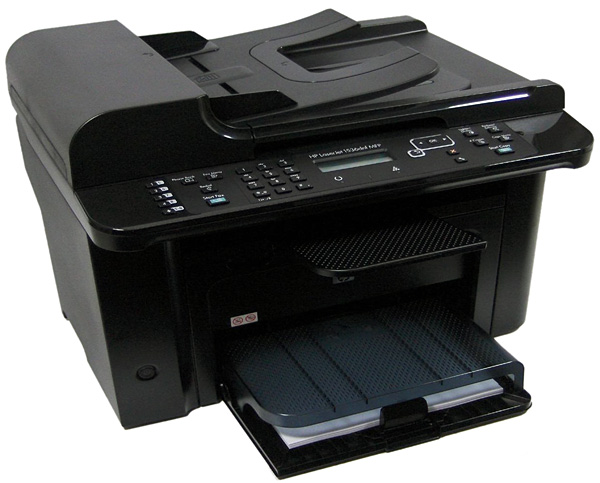
There’s not much striking about the design of the machine. All in textured and high-gloss black, it looks purposeful, but not particularly elegant. The 35-sheet Automatic Document Feeder (ADF) on the flatbed scanner has a cheery little quiff at its end, and token curves mark out the corners of all the paper trays.

The control panel is logically laid out and is set around a 2-line by 16-character mono LCD display. To the left is a numeric pad for fax dialling, with a set of four fax-related buttons to its left and then finally five quick-dial keys, which look like an afterthought, as they don’t quite sit on the textured control panel. To the right of the display are five buttons for menu navigation and at the extreme right a further five handle copy functions.

The whole of the scanner section hinges up, unusual for a laser multifunction, and the cover to the laser printer section lifts up to give access to the combined drum and toner cartridge, which slots down deep into the middle of the printer.

The main paper tray is formed by the front cover which hinges down and HP provides a chunky, industrial-look paper tray cover, which also acts as a feed tray for the 10-sheet, multi-purpose feed. There’s a power button to the left of the paper trays and at the back are sockets for USB, Ethernet, phone line and optional third-party handset.

There’s no wireless option on this printer, but if you connect it as a network machine, you can sign up and use it with HP’s ePrint system. Documents can then be e-mailed directly to the LaserJet Pro M1536dnf MFP, if that is your delight.

Drivers are provided for Windows, OS X and a wide range of Linux implementations and both Postscript in emulation and HP’s own PCL6. ReadIRIS software is there for OCR and HP’s own fax and scan utilities complete the suite.


HP claims speeds up to 25ppm for this machine, but this is wishful. Under normal use, we think you’ll see closer to 16ppm, which was the fastest we saw under test, on our 20-page text document. Unlike many machines we test, though, it isn’t because of excessive processing time before a print starts. HP claims a first page out in 8.5s and we saw pages start to print in 11s, which is quick.

Shorter documents are not as quick, with our five-page text test giving 14.3ppm and the text and graphics one managing 16.7ppm. These are healthy speeds, but not in the same league as the claims. The duplex speed holds up pretty well at 13.5ppm and copy times of 10s for a single sheet from the flatbed and 30s for five sheets from the ADF are also good, as is 10s for a 15 x 10cm photo on A4.

Print is pretty much what you expect from a mono laser: clean cut black text with no signs of toner anywhere it shouldn’t be. Greyscale graphics look a bit mottled, but are passable and our test photo print showed no banding, though again a slight unevenness in large areas of grey, as in skies.

A single drum and toner cartridge is the only consumable the printer needs and it has a reasonable page yield of 2,100 pages. At current Internet prices, we calculate a cost per ISO page of 3.4p, including 0.7p for paper. This cost sits in the middle of the band for similar devices, though a machine like Brother’s DCP-7045N manages 2.8p, quite a bit lower.

Verdict

This is a good, general-purpose mono laser multifunction printer, though there’s little to get excited about. Duplex print is a useful paper saver, but without duplex scanning and copying, some of the potential is wasted. The jury’s still out on how useful it is to be able to ePrint directly to your printer, but the facility is there, if you want it.


Review: HP Muscles In On Brother With A Heavyweight A3 Printer

HP is dipping its toe into the all-in-one printer market for larger prints, trying to jostle Brother from an area in which it previously had sole occupancy. So is the market large enough for a new entrant, and does HP’s A3+ offering cut the mustard?

Key Features
A3+ print
ePrint remote printing
Wireless networking with quick setup
Touchscreen/touchpanel controls
Memory card slots

Until recently, the only manufacturer making inkjet all-in-one printers that could handle paper larger than A4 was Brother. HP obviously thinks the market is now large enough for it to dip a toe in the water and has introduced the Officejet 7500A, which is an A3 machine. It’s not fully committed to the larger size, though, as it can only print to large paper sizes; its scanner is still restricted to A4.

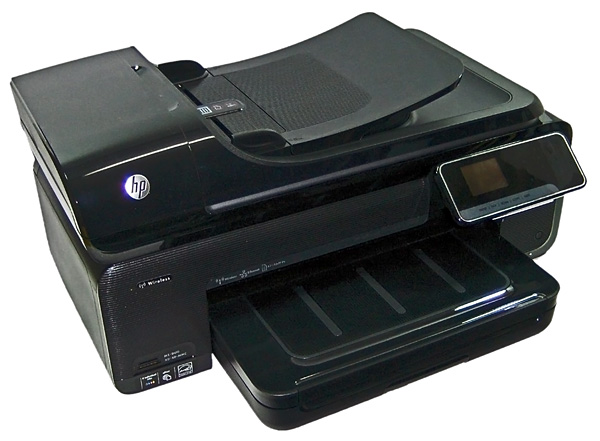
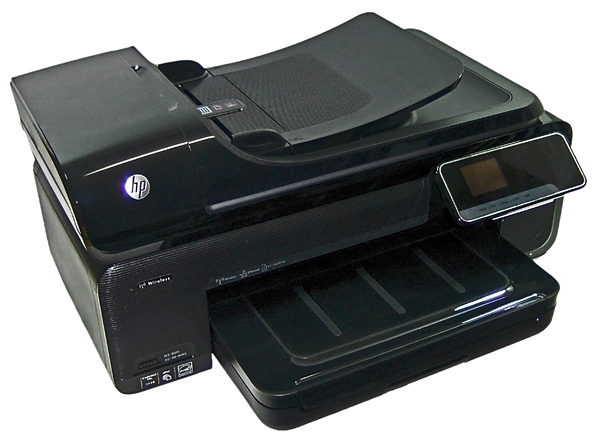
This is another big, glossy black device, longer than normal because of the wider carriage. It’s also a funny mixture of shapes, textures and styles. At the top, its flatbed scanner has a 35-sheet Automatic Document Feeder (ADF) with an odd curve to its feed tray and another to its top. This sits on top of the main printer section of the machine has a slight backward lean at its left-hand end, and the left side appears to sit lower than the right.

The printer has a horizontally textured front surface and the join between scanner and printer is interrupted by a wide control panel with touch controls and a 60mm LCD touchscreen.

Below the control panel is a wide paper tray, which can take paper from 15 x 10 cm, right up to 13 x 19 inches, but with no separate feed for photo paper. To accommodate the larger paper sizes, both the bottom and top halves of the tray telescope outwards, though the base and lid are not the same shape, which makes it look a little odd when expanded. To the left of the paper tray are two memory card slots, which between them take SD, Memory Stick and xD cards.

At the back are sockets for USB, Ethernet and low-voltage power from a separate power block, but the machine also supports wireless connection and push-button setup, if your wireless router supports this.

Software installation is straightforward, with OCR software and a photo-stitching editor from ArcSoft in the bundle. Being HP, the machine also supports ePrint, so you can print directly to the Officejet 7500A from phones, tablets and notebooks. There’s also a range of apps, which can be downloaded to the printer from the HP site.


HP quotes speeds in draft mode and in laser quality mode but not in the default normal mode, which is a bit inconsistent. Draft print is said to reach 33ppm in black and 32ppm in colour, which is more than a little optimistic. Our five-page text print in draft mode took 34s, with half this time spent pre-processing, before paper even begins to feed. This gives a true draft speed of 8.8ppm, little more than a quarter of the claim.

In normal print mode, the best speed we achieved was 9ppm for black print and 4.5ppm for black text with colour graphics. These speeds should have been faster than the 10ppm and 7ppm quoted for laser quality print. An A4 copy took 30s, a 15 x 10cm photo completed in 40s and a full A3 photo print took 3mins 30secs, which again lacks a certain urgency.

The print quality from the machine varies with what it’s doing. Text print is clean and sharp and draft mode text is very nearly as good as normal mode, while being a lot quicker to print. Business graphics are also well reproduced and colours are good and solid and hold up well in copies as well as direct prints. Black text copies are rather over-thick, though, and text looks almost bold.

Top and bottom margins in A3 prints are wider than normal, at a good 20mm and we lost output from our standard test page, which rival machines reproduced without problem. Photo prints are fair, though colours can look a little soapy in comparison with some of the competition.

The OfficeJet 7500A uses four inks, with only black available in two different yields. Using the highest yield black for best economy gives an ISO black page cost of around 6 cents and an equivalent colour page cost of 15 cents. Both these are average, without being outstanding and are not as good as from, for example, the HP Officejet 8500A.

Verdict

For certain office applications, A3 and A3 print can be a definite advantage. Posters and folded A4 newsletters are obvious examples, though the lack of duplex print in the Officejet 7500A mitigates against folded documents. Even so, print quality is considerably better than from Brother’s A3 all-in-ones and the machine feels a lot more solid than they do.


For the original story click here

Review: HP Muscles In On Brother With A Heavyweight A3 Printer

HP is dipping its toe into the all-in-one printer market for larger prints, trying to jostle Brother from an area in which it previously had sole occupancy. So is the market large enough for a new entrant, and does HP’s A3+ offering cut the mustard?

Key Features
A3+ print
ePrint remote printing
Wireless networking with quick setup
Touchscreen/touchpanel controls
Memory card slots

Until recently, the only manufacturer making inkjet all-in-one printers that could handle paper larger than A4 was Brother. HP obviously thinks the market is now large enough for it to dip a toe in the water and has introduced the Officejet 7500A, which is an A3 machine. It’s not fully committed to the larger size, though, as it can only print to large paper sizes; its scanner is still restricted to A4.

This is another big, glossy black device, longer than normal because of the wider carriage. It’s also a funny mixture of shapes, textures and styles. At the top, its flatbed scanner has a 35-sheet Automatic Document Feeder (ADF) with an odd curve to its feed tray and another to its top. This sits on top of the main printer section of the machine has a slight backward lean at its left-hand end, and the left side appears to sit lower than the right.

The printer has a horizontally textured front surface and the join between scanner and printer is interrupted by a wide control panel with touch controls and a 60mm LCD touchscreen.

Below the control panel is a wide paper tray, which can take paper from 15 x 10 cm, right up to 13 x 19 inches, but with no separate feed for photo paper. To accommodate the larger paper sizes, both the bottom and top halves of the tray telescope outwards, though the base and lid are not the same shape, which makes it look a little odd when expanded. To the left of the paper tray are two memory card slots, which between them take SD, Memory Stick and xD cards.

At the back are sockets for USB, Ethernet and low-voltage power from a separate power block, but the machine also supports wireless connection and push-button setup, if your wireless router supports this.

Software installation is straightforward, with OCR software and a photo-stitching editor from ArcSoft in the bundle. Being HP, the machine also supports ePrint, so you can print directly to the Officejet 7500A from phones, tablets and notebooks. There’s also a range of apps, which can be downloaded to the printer from the HP site.


HP quotes speeds in draft mode and in laser quality mode but not in the default normal mode, which is a bit inconsistent. Draft print is said to reach 33ppm in black and 32ppm in colour, which is more than a little optimistic. Our five-page text print in draft mode took 34s, with half this time spent pre-processing, before paper even begins to feed. This gives a true draft speed of 8.8ppm, little more than a quarter of the claim.

In normal print mode, the best speed we achieved was 9ppm for black print and 4.5ppm for black text with colour graphics. These speeds should have been faster than the 10ppm and 7ppm quoted for laser quality print. An A4 copy took 30s, a 15 x 10cm photo completed in 40s and a full A3 photo print took 3mins 30secs, which again lacks a certain urgency.

The print quality from the machine varies with what it’s doing. Text print is clean and sharp and draft mode text is very nearly as good as normal mode, while being a lot quicker to print. Business graphics are also well reproduced and colours are good and solid and hold up well in copies as well as direct prints. Black text copies are rather over-thick, though, and text looks almost bold.

Top and bottom margins in A3 prints are wider than normal, at a good 20mm and we lost output from our standard test page, which rival machines reproduced without problem. Photo prints are fair, though colours can look a little soapy in comparison with some of the competition.

The OfficeJet 7500A uses four inks, with only black available in two different yields. Using the highest yield black for best economy gives an ISO black page cost of around 6 cents and an equivalent colour page cost of 15 cents. Both these are average, without being outstanding and are not as good as from, for example, the HP Officejet 8500A.

Verdict

For certain office applications, A3 and A3 print can be a definite advantage. Posters and folded A4 newsletters are obvious examples, though the lack of duplex print in the Officejet 7500A mitigates against folded documents. Even so, print quality is considerably better than from Brother’s A3 all-in-ones and the machine feels a lot more solid than they do.


For the original story click here

REVIEW: HP Mono Laser Jet

The market for multifunction printers in particular, mono models has become very competitive. We take a look at the new HP LaserJet ProM1536dnf to see just how well it stacks up.

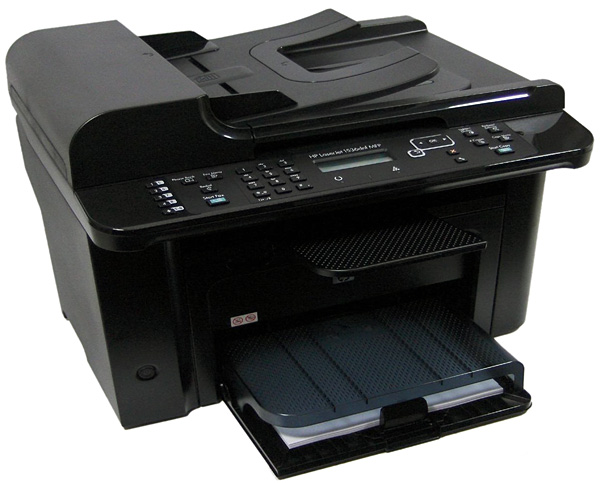
There’s not much striking about the design of the machine. All in textured and high-gloss black, it looks purposeful, but not particularly elegant. The 35-sheet Automatic Document Feeder (ADF) on the flatbed scanner has a cheery little quiff at its end, and token curves mark out the corners of all the paper trays.

The control panel is logically laid out and is set around a 2-line by 16-character mono LCD display. To the left is a numeric pad for fax dialling, with a set of four fax-related buttons to its left and then finally five quick-dial keys, which look like an afterthought, as they don’t quite sit on the textured control panel. To the right of the display are five buttons for menu navigation and at the extreme right a further five handle copy functions.

The whole of the scanner section hinges up, unusual for a laser multifunction, and the cover to the laser printer section lifts up to give access to the combined drum and toner cartridge, which slots down deep into the middle of the printer.

The main paper tray is formed by the front cover which hinges down and HP provides a chunky, industrial-look paper tray cover, which also acts as a feed tray for the 10-sheet, multi-purpose feed. There’s a power button to the left of the paper trays and at the back are sockets for USB, Ethernet, phone line and optional third-party handset.

There’s no wireless option on this printer, but if you connect it as a network machine, you can sign up and use it with HP’s ePrint system. Documents can then be e-mailed directly to the LaserJet Pro M1536dnf MFP, if that is your delight.

Drivers are provided for Windows, OS X and a wide range of Linux implementations and both Postscript in emulation and HP’s own PCL6. ReadIRIS software is there for OCR and HP’s own fax and scan utilities complete the suite.


HP claims speeds up to 25ppm for this machine, but this is wishful. Under normal use, we think you’ll see closer to 16ppm, which was the fastest we saw under test, on our 20-page text document. Unlike many machines we test, though, it isn’t because of excessive processing time before a print starts. HP claims a first page out in 8.5s and we saw pages start to print in 11s, which is quick.

Shorter documents are not as quick, with our five-page text test giving 14.3ppm and the text and graphics one managing 16.7ppm. These are healthy speeds, but not in the same league as the claims. The duplex speed holds up pretty well at 13.5ppm and copy times of 10s for a single sheet from the flatbed and 30s for five sheets from the ADF are also good, as is 10s for a 15 x 10cm photo on A4.

Print is pretty much what you expect from a mono laser: clean cut black text with no signs of toner anywhere it shouldn’t be. Greyscale graphics look a bit mottled, but are passable and our test photo print showed no banding, though again a slight unevenness in large areas of grey, as in skies.

A single drum and toner cartridge is the only consumable the printer needs and it has a reasonable page yield of 2,100 pages. At current Internet prices, we calculate a cost per ISO page of 3.4p, including 0.7p for paper. This cost sits in the middle of the band for similar devices, though a machine like Brother’s DCP-7045N manages 2.8p, quite a bit lower.

Verdict

This is a good, general-purpose mono laser multifunction printer, though there’s little to get excited about. Duplex print is a useful paper saver, but without duplex scanning and copying, some of the potential is wasted. The jury’s still out on how useful it is to be able to ePrint directly to your printer, but the facility is there, if you want it.