Smart Office

Canon Shoots Laser Printers To The Office

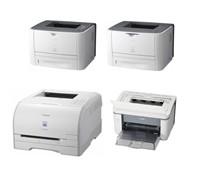
Canon has just released three new mono laser printers and a coloured laser printer that caters to small and medium businesses.


Click to enlarge
The new mono Laser Shot range (LBP-3370, LBP-3310, and 3250) as well as the new coloured Laser Shot (LBP-5050N) claims to minimise paper and overall power consumption, saving money and environmental resources for your business in the process.

Canon Australia’s Brand Manager for Consumer Imaging Product Group, Alyson Barden said, “Small and medium businesses can benefit greatly from the quality prints and stylish look of these new Laser Shot models. Each model is uniquely suited for different office sizes, but the one constant is the ability to create quality output quickly at a reasonable price.”

LASER SHOT LBP-3370

The LASER SHOT LBP-3370 is a mid-range mono printer that claims to offer high-quality prints at 9600 x 600 dpi resolution. It can be shared among small workgroups with its network capability and large print trays, which can hold 300 sheets at once. Canon’s High-speed “CAPT
3.0″ printing technology delivers 26 pages per minute and the ability to print double-sided sheets.

Canon’s On-Demand Fixing System saves power consumption with instant warm up, delivering the first print in only 6.5 seconds. The LASER SHOT LBP-3370 also comes with an All-in-One cartridge system, which combines the drum, toner and waste toner box all in one cartridge.


LASER SHOT LBP-3310

The LBP-3310 claims to print at a rapid speed of 26 pages per minute and offers double-sided prints at 13.3 ppm. It comes with Canon’s On-Demand Fixing System that instantly warms up that unit and delivers the first print in 6.5 seconds.

A gradation control enables a high-definition print resolution of 9600 x 600 dpi, and also features efficient and hassle-free All-in-One toner cartridges and quick start-up for low power consumption.

LASER SHOT LBP-3250

Printing at a resolution of 1200 x 600 dpi and featuring the PC-processing “CAPT” technology, the LBP-3250 produces high-quality prints and allows any small business to work more efficiently in terms of both time and costs.

Key Product Points for the LASER SHOT LBP-3310, LBP-3370 and LBP-3250

  • High-Performance Printing System – CAPT technology works with PC processing power
  • All-in-One Cartridges – combines consumables in one for hassle-free operation
  • Auto duplex (double sided) prints – reduced paper consumption
  • Instant Warm-Up – no waiting for prints, 0 seconds from stand-by mode
  • High-quality prints up to 9600 x 600 dpi – professional results
  • Low Power Consumption and Quick Start Up – saves energy, allows for immediate prints
  • Appealing design – easy to fit in small offices


Click to enlarge
Laser Shot LBP-5050N

This printer will fit small office spaces as it sports a low design and easily to access paper tray. Network capability allows multiple employees to print at once from their work stations. An assortment of paper types, including heavy paper and envelopes, allow for a variety of print projects and creative applications in both colour and mono.

The LBP-5050N claims to have a print speed of 8 pages per minute in colour and 12 ppm in mono, and is equipped to print with resolution of 9600 x 600 dpi.

The LASER SHOT LBP-5050N consumes less energy and reduces carbon emissions by only using 4W power in stand-by mode and comes with an All-in-One cartridge system which combines the drum, toner and waster toner box all in one cartridge.

Key Features of the LASER SHOT LBP-5050N

  • High-Performance Printing System – CAPT 3.0 technology works with PC processing power
  • All-in-One Cartridges – combines all consumables in one unit
  • High-quality prints up to 9600 x 600 dpi
  • Low Power Consumption and Quick Start Up – saves energy, allows for immediate prints
  • Appealing design – easy to fit in small offices

Pricing and Availability

The Laser Shot LBP-3370 (RRP $649), LBP-3310 (RRP $399) LBP-3250 (RRP $199), and LBP-5050N ($449) are available through Canon dealers now.

See: www.canon.com.au
Cheap DVD Burners From Sony

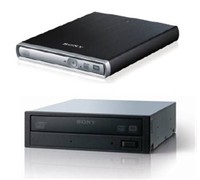
Users can now own a Sony DVD burner for as low as $59 as the company released two new DVD burners (one external, one internal) that are 30 percent cheaper than its previous models.


Click to enlarge
The external slim portable DRXS70UR and the internal DRUV200A DVD burners are supplied with Nero 8 software and will have support for multiple DVD and CD formats.

Sony DRXS70UR – Sony Slim Portable DVD Burner
– External Portable DVD Burner
– Supports all major DVD/CD formats
– Weighs 440g
– USB 2.0 interface
– Supplied with Nero 8 software
– Windows and Macintosh compatible

RRP: $149.00

Sony DRUV200A – Sony Internal 20X DVD Burner
– Internal 20X DVD Burner
– Multi-format Compatibility – supports all major DVD/CD formats
– IDE/ATAPI interface
– Supplied with Nero 8 software
– Windows 2000/XP/Vista Compatible

RRP: $59.00

See: www.sony.com.au

New Video Conferencing Service Saves Money

Want to have a conference but cannot afford the hefty price tag that comes with it? Australian company Attend Anywhere understands that and may solve that problem with its affordable video conferencing service.


Click to enlarge
The company has just launched its latest professional networking, video collaboration and service delivery logistics platform that will help businesses both large and small ‘improve their face to face communication but at a fraction of the cost of traditional video conferencing. ‘
 
Attend Anywhere’s CEO, Mr Chris Ryan said, “At the moment we’re seeing plenty of buzz around video conferencing as an alternative to travel at a time when rising fuel costs and a desire to cut carbon emissions are forcing companies to reassess their travel budgets. However with costs to set up a video conferencing system that covers two sites from around $20,000 – $200,000 it’s not really a viable alternative for many organisations.”
 
“By contrast, to access high definition videoconferencing within the new Attend Anywhere platform requires only a computer, a $100 webcam and a high-speed internet connection, and it can all happen at your desk at the click of a button,” he added.


Attend Anywhere uses a new videoconference platform called Vidyo which utilises a new IP standard to deliver TV quality videoconferencing over the internet using a standard computer and webcam.

Mr. Ryan said that Attend Anywhere’s new platform was developed from the learning gained after years of grappling with the challenges of providing education, medical and consulting services and collaboration using traditional video conferencing systems. Mr. Ryan added that while the cost and accessibility issues often hampered the use of video conferencing, organisations also grappled with complicated process issues when providing meetings and other services via video conference.
 
Attend Anywhere’s platform enables organisations to use the same process for managing video conference participation as for in-person participation as well as providing content management and promotion, logistics management and administration, financial, legal management systems.

See: www.attendanywhere.com

WD Offers Huge Storage Box

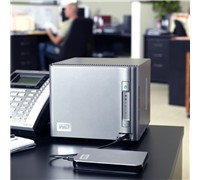
WD has unveiled a network storage system that can store huge amounts of data and can act as a centralised storage box for small office and home networks.


Click to enlarge
The WD ShareSpace is a 4-bay storage system with Gigabit Ethernet (GigE) interface that provides up to 4 TB of storage capacity and multiple RAID configurations. The ShareSpace network-attached storage system makes it simple for small offices and workgroups to centralize storage for easy accessibility – both within the network and remotely via WD’s MioNet remote Web access service.

According to WD, home users can easily connect the WD ShareSpace system to their home network to centralize their media collections and access them from anywhere in their home. The included iTunes server capability allows a user to play their music on any Mac or PC using iTunes software.

And with the included WD Anywhere Backup software, users choose specific files or folders for backup during the set-up process. Any changes or additions made to those files or folders will be updated and backed up automatically.


Click to enlarge
Vice President and General Manager of Western Digital’s Branded Products and Consumer Electronics Groups, Jim Welsh said, “With the WD ShareSpace storage system, small offices and home network users can experience the same centralized storage and data protection often found only in big corporate data centres. The set-up process is a breeze, so you can be up and running in a matter of minutes. This WD ShareSpace system offers big-time storage without the need for a big-time IT department.” 

Other Product Features:

– Small profile with 4-bay storage system
– GigE connectivity
– RAID 0/1/5 capabilities
– MioNet remote Web access service (for PC and Mac)
– Automatic and continuous network backup software to back up 3 computers
– E-mail alert system that monitors drive and system health and sends you an e-mail if a problem is detected
– Microsoft Active Directory directory service support
– One touch USB file transfer
– Consumes up to 33 percent less power
– Download manager that supports scheduled downloads through FTP and HTTP
– iTunes server
– Windows Vista operating system ready
– Built-in FTP server
– 3 USB 2.0 ports

Pricing and Availability:

The Western Digital ShareSpace is available now with an RRP of $749 (2TB) and $1499 (4TB).

See: www.wdc.com

Wi-Fi Magic With Mitsubishi Projector

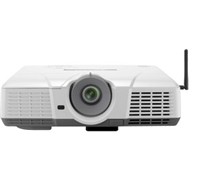
Mitsubishi Electric has announced a projector that comes with built-in Wi-Fi, eliminating the need for a direct cable connection to your PC during presentations.


Click to enlarge
The XD530E DLP projector is a 3000 ANSI lumens projector that includes a built-in antennae to provide wireless connectivity (802.11 b/g) and comes with a 6-segment colour wheel that guarantees to produce brilliant colours.

The projector also features a 2000:1 rich contrast ratio, splash screen and wall colour support, and a centre lens design for easy symmetrical installation. It also comes with an instant shutdown feature for quick shutdown, as well as DVI connectivity, a filter free design, and a top access lamp cover for easy lamp replacement.

For added security, the XD530E has a reinforced anchor bar and password protection.

Availability and Pricing

The XD530E is now available with an RRP of $2,599.

See: www.MitsubishiElectric.com.au

NEC Enters Netbook Market

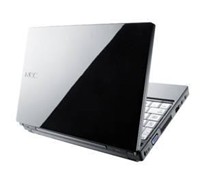
NEC wants to have a piece of the ultraportable PC pie with the launch of its new netbook.


Click to enlarge
The NEC Versa N1100 is only 31.3mm thick, weighs 1.17kg, uses Intel’s Atom processor, and comes with 160GB hard drive as well as a gigabyte or RAM. It also runs on Windows XP Home Edition (SP2) just like any other netbooks in the market, but offers a power-off USB charging feature that allows a user to charge digital music even when the notebook is turned off.

The N1100 comes built-in with 802.11b/g wireless LAN, Gigabit LAN, a 0.3-magapixel web camera, and an anti-glare LCD panel to reduce reflection.

The standard glide pad was replaced by NEC in favour of an “NX Pad” that claims to add gesture functions that ‘enable intuitive operations dramatically improving ease of operation.’ For example, moving two fingers apart of together on the pad magnifies or reduces the fonts of web pages, while pulling the finger away from the pad moves the mouse pointer to the edge of the screen.


NEC Computers Australasia’s Marketing Manager, Darren Brain said, “The launch of the NEC VERSA N1100 adds a new category to NEC’s extensive range of personal computing products, catering to a new segment of users with a new set of needs.  Users can now enjoy the total freedom of internet access and replying to emails on the move.  This is representative of our continuous dedication and commitment to the personal computer market.”

NEC VERSA N1100 Specifications

  • Intel Atom processor N270 1.60GHz
  • Microsoft Windows XP Home Edition SP2
  • 8.9″ WSVGA display (1024 x 600) with Anti-Glare Coating
  • Intel 945GSE Express Chipset
  • 160GB SATA Hard Disk Drive (5400RPM)
  • 1GB DDR2 RAM
  • 2 Speakers (1W each)
  • 3 USB 2.0 Ports
  • Gigabit LAN and 802.11b/g Wi-Fi
  • 3-in-1 Memory Card Reader (MS/SD/MMC)
  • 0.3MP Webcam
  • 3 Cell Li-Ion Battery

Availability and Pricing

The first model in the series becomes available for sale in Australia in the second half of November 2008 with an expected RRP of $749.

See: www.nec.com.au

Sensis List Businesses On Google Maps

Sensis and Google have agreed to provide Australians with access to Yellow business listings on Google Maps.

Through this agreement, Google Map users will be able to search across all local business listings provided by Yellow and will make it possible for businesses advertising with Yellow to be found by potential customers.

Sensis CEO, Bruce Akhurst, said, “This agreement combines Sensis’ strong capabilities in advertising sales and local business content and Google’s strong capabilities in online search and mapping technology. Helping our customers grow their business is at the heart of everything we do. This agreement enables our Yellow advertisers to further extend their online presence and benefit from the significant reach of Google Maps. It’s all about helping to deliver more customers through their doors.”

General Manager of Google Australia, Karim Temsamani said, “We’re always looking for high quality content for our users. This agreement is great news for our users who now have the most comprehensive source of Australian local business information at the click of a mouse through Google Maps,” he said.

“In all sectors of the economy, the Internet is an important part of Australians’ research and buying patterns, whether they buy online or offline. Small businesses are realising the importance of extending their presence online to reach customers. Searching Google Maps is a popular way for consumers to find local businesses and services.”

Google Maps, which includes popular features such as My Maps and Street View, is available online at maps.google.com.au. 

Business listings from Yellow are scheduled to be available in the first quarter of the 2009 calendar year.

Navman Sets New Standard With Platinum GPS

The Navman S300t brings a lot of clever features to the table and sets a new benchmark in portable navigation. It has a large and bright touch screen, sports a small and compact design, and simplifies the way we go from one place to another.


Click to enlarge
Shelling out $699 for a navigation device seems steep, especially now as we are heading towards tough economic times. But be rest assured that Navman has included a lot of features that make it well-worth purchasing.

Besides its built-in TMC receiver, FM transmitter, 3D lane guidance, 3D landmarks, and hand-free connectivity via Bluetooth, the S300t also comes with functions like Local Live Search and tons of safety and speed alerts to keep you safe.

The S300t has a dimension of 130 x 78 x 13.5 mm and sports a brushed aluminium finish, which adds a nice touch to the exterior. The unit is bundled with a DVD (NavDesk and Manuel), a suction cup, a mounting bracket, a USB port, and a cigarette adaptor that second functions as an external antenna.


Click to enlarge
Unlike the S90i we reviewed last year, the S300t makes do without all the unnecessary jacks (antenna, microphone, and headphone) and only has a single power button on top of the unit. A microSD card slot used for storing files and the charging/USB port is located at the bottom of the unit. Finally, the unit’s speaker is located at the rear part of the unit, which can go loud when set to the maximum volume.

The unit will ask you to select a default language (12 available) on start-up, helping users who do not speak/read English. A short tutorial pops up right after the language selection, but users can opt to skip this process altogether and dive straight in.

Users must press the blue strip located at the bottom right of the screen in order to access the main menu. The main menu consists of 12 icons (Go, Find, Explore, Connect, Driving Map, My Places, Settings, Traffic, Petrol, Parking, Phone, and Media) that makes navigating straightforward.

The unit is easy to place in the cradle: it is all a matter of just aligning the cradle slots of the S300t to the mount. This particular model comes with TMC built-in, so users can receive live information with the help of the in-car charger that acts as an external antenna.


There are a couple of ways to input your destination: you can find an area, find a place by keyword, find a street address, find a postcode, and find nearby. To go to QVB, for example, we had to type Queen Victoria Building on the ‘Find by keyword’ option. Two results were shown (parking garage and Shopping Centre) and all we had to do was to choose which one we wanted to go to. The screen was also responsive and it was easy for us to browse and scroll through the menus and glide around the maps.

The Map screen’s layout is simple and free from clutter, making it easy for us to know exactly where we are and where we need to turn. Various features like 3D Landmarks, 3D Lane guidance, and text-to-speech found on the S300t enhanced the device, making navigation simpler.

The built-in TMC receiver allowed us to connect to Suna’s traffic messaging network. The unit displays ‘traffic events’ on your route, with users having the option to avoid an event by creating a detour. While the traffic system worked well most of the time, we have encountered several occasions when the traffic in our route (along M5) was not picked up.


Click to enlarge
Navman has also included a DVD that contains the user’s manual and the NavDesk Software. The NavDesk program lets a user to purchase new maps, purchase accessories for the S300t, register the product, tweak the unit settings (My Navman), check and search photos for the NavPix feature, customise POIs (points-of interest), and even edit and transfer audio files using My Media. It may take a while to get used to the interface, but once a user familiarises him/herself with the functions, it is smooth sailing from there.

The Navman S300t lasted for an hour in our ‘Pedestrian Mode’ test. Charging the unit requires a user to hook up the unit to the computer (via USB) or inside the car (in-vehicle charger), as there is no AC adaptor included in the package.

With a great mapping software, clear spoken street names, 3D Landmarks, built-in TMC receiver, and Bluetooth connectivity, the Navman S300t is well-worth its price. If you want the best portable navigation device money can buy, then take the plunge and purchase this device.

See page over for product specifications and pricing:


Navman S300t Platinum Specifications:

Hardware:
Memory: 2GB
RAM: 128MB
Processor: 400 Mhz
Card Slot: microSD

Key Features:
– 4.3-inch Flat Wdiescreen
– Red Light / Speed Cameras
– Premium Safety Alert: School Zones, Railway Crossings, Black Spots
– Bluetooth Hands-Free
– Voice Instruction via FM
– 3D Landmarks
– 3D Junction View
– Extended Lanes Information
– Mileage Reporter
– SUNA Traffic
– Intelligent Destination Keyword Search
– Instant Location Capture Button
– Live Local Search (via Bluetooth)
– Fuel Efficiency Mode
– Pedestrian Mode
– Points of Interest: 580k
– Road Toll Alerts

Map Data Supplier: Navteq 2008 Q2
Product Dimensions: 130x78x13.5mm
Net Weight: 150g

————————————
Navman S300t | $699 |  | www.navman.com.au

For: Large screen; Form Factor; Simple Interface; Built-in TMC; 3D Landmarks and Lane Guidance; Good TTS
Against: Occasional problems with TMC service; Unit has a hard time picking up a signal in the city; Only lasts one hour on pedestrian mode
Conclusion: Navman’s best navigation device to date.

Quick Digital Archiving With Epson Scanner

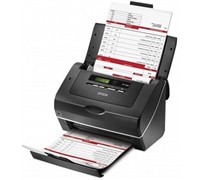
Epson has launched two high speed sheet-fed scanners that can capture database information and whole documents for immediate use or for archiving purposes.


Click to enlarge
Epson claims that the GT-S80 scans 40 pages per minute (ppm) single sided and 80 images per minute (ipm) in a double sided scan, while the GT-S50 scans at 25 ppm single sided and 50 ipm double sided.

The GT-S50 and GT-S80 both have dual CCD technology that scan up to 600 dpi for fast double-sided scanning and comes with a 75 page feeder for rapid capture of large multi page documents. It can scan A4, legal, letter, B5, B6, A5, and A6 documents, as well as ID and business cards. 

The Epson Scan 3.6 software comes with automatic de-skewing and background colour removal, hole punch removal, blank page skip, text enhancement, single colour enhancement or single colour dropout, and image or graphics enhancement for better scanned images.


Documents can be saved as searchable PDF (Windows only), compressed PDF (2 compression levels: Standard and High), encrypted PDF with a password, along with several other PDF save features.

The GT-S50 and GT-S80 can also perform direct scanning to IT applications or folders such as Microsoft Share Point, Network or FTP folders.  Users can customise these job settings by assigning a VBS script to launch actions in Epson Event Manager allowing easy integration of scanning jobs into document management system processes.

The scanners also have Hi-Speed USB 2.0 connectivity to any PC, and are compatible with Windows and Macintosh operating systems.

The GT-S50 and GT-S80 will have an RRP of $999 and $1299 respectively and are available from Epson distributors.

See: www.epson.com.au 

100Mbps Broadband Now A Real Option Within 24 Months

Telstra is about to crank up its broadband network in an effort to offer Australians a blisteringly fast broadband network that could be running speeds of up to 100mbps in about 24 months versus a minimum of five to seven years for the federal government-backed broadband network which Telstra was excluded from today.

Currently, Telstra’s BigPond Cable Extreme is available to more than 1.8 million Sydney and Melbourne homes and businesses at up to 30 Mbps, and up to 17 Mbps in all other parts of Telstra’s HFC network.

However, Telstra will continue to invest in its Next G and Hybrid Fibre Coaxial (HFC) cable networks to ensure that the company delivers the best broadband experience. Last year, Telstra has revealed that it was already experimenting with pre DOCSIS 3.0. According to various reports, the test was able to produce speeds of up to 75Mbps in Sydney and 100Mbps connectivity over the HFC network in Melbourne.

In addition to the upcoming fast broadband, Telstra is set to ‘super-charge’ its Next G Network, giving users wireless broadband speeds of up to 21Mbps by early next year. This move from 3.6Mbps to 21Mbps will provide extra speed, flexibility, and productivity in the network footprint covering more than two million square kilometres and 99 percent of the Australian population.

Telstra’s Executive Director, Wireless Engineering and Operations, Mike Wright said that this surge in available data speeds will allow more Australians to work away from the office. ‘They will be equipped to integrate new applications – including web conferencing, live high definition streaming video, high-speed web browsing, and seamless virtual private network access – into the way they do business on the move,” Mike added.

See: www.telstra.com