Smart Office

Olin Wireless Charger Very Limited

Following our review on the new Uniden Power Pad last week, we were curious to see how the new Olin Wireless Charger For iPhone would compare.


Click to enlarge

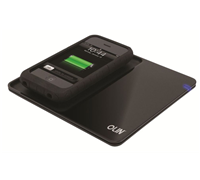
Like the Uniden Power Pad, the Olin Wireless Charger is easy to use. Every time we needed to charge the unit, we simply had to drop it on the mat. Out of the box you get an AC adaptor, charging pad, and a receiver sleeve for the iPhone.

Once the iPhone in placed in the receiver sleeve, a user can place it onto the charging pad for charging. The blue light will illuminate during the charging process and will switch off as soon as the charging is done. Olin says that the wireless charger comes with over/under voltage protection, short circuit protection and overcharge protection.

Since the package only comes with one sleeve, you can only charge your iPhone out of the box. In addition, the pad only has enough space for the iPhone, making it very limited. It could have been better if Olin added an accessory similar to Uniden’s Power Disc to charge other products, but as of this time of writing, it seems that there isn’t any.

It took about two hours to fully charge our iPhone. During our test, we heard a faint but annoying ticking sound coming from the unit. It is only by turning up our digital radio that we were able to drown the sound.

Overall, we found the Olin Wireless Charger For iPhone to be very limited. Sure it charges your iPhone, but for $149, we were expecting more from this product. If you want a wireless mat that can charge more than your iPhone, then we recommend the Uniden Power Pad Deluxe Kit that comes with the pad, an iPhone sleeve and a power disc with 8 interchangeable tips for $179.95.
 

Review: Torch Shines Brightly For Blackberry

RIM has taken a step forward with its new Blackberry Torch. Its screen, hardware and software offerings pale in comparison to the Apple iPhone, HTC Desire, or Samsung Galaxy S, but those who own and use a Blackberry will definitely love this new handset for its new operating system and dual input modes.


Click to enlarge

The Torch 9800 has a touchscreen and a slide out QWERTY keyboard that gives users two options when composing e-mails or chatting with friends. One of the first few things that users will notice is that it’s a bulky and hefty phone – the Torch is 14.6mm thick and weighs 161.1 grams. However, this handset feels solid and is great to hold.

The 3.2-inch HVGA+ touch screen is responsive and its virtual keyboard is well-spaced. Despite having large fingers, I was able to compose messages using only the touch screen with minimal problems. The slide out QWERTY keyboard is not as raised as the Bold 9700 but was still comfortable to use. Those who are used to having a physical keyboard will definitely appreciate what RIM has done for the Torch.

In addition to the slide out keyboard, the handset also comes with several buttons including lock, mute, camera, volume, send/pickup, menu, back, and power/end. The optical trackpad found in the middle of the device allows for easy navigation and scrolling.


Click to enlarge

The new operating system not only gives the Torch an all-new look, but it also comes with a lot of features that simplify the Blackberry ecosystem. The home screen now comes with a drop down notification bar that is able to display unread e-mails (subject), BBM messages, Facebook notifications, and text messages in a glance. Clicking on the icon instantly takes the user to the e-mail, SMS, or chat window, making the process of checking and replying to messages faster than before.

Clicking the top bar which displays the time, date, carrier and signal brings down a setup menu that allow users to turn on Wi-Fi and/or Bluetooth, set the alarm, and set up various services. The Torch also comes with a universal search tool that can search for just about anything stored on the phone (such as a contact, e-mail, or setting) as well as online content.

The bottom of the screen has an all-new ‘drawer’ system that has five different categories: All, Favorites [sic], Media, Downloads, and Frequent. Like older Blackberry handsets, users can move four of their most used applications to the top for quick access. If a user wants to see more than four applications on the home screen, he/she can simply drag the tab up to have eight or 12 icons displayed at once.

One of the things that we liked about this new system is that we can add phone contacts, BBM or IM contacts, and even websites to our home screen and even mark them as ‘Favorites’. These shortcuts take the level of Blackberry customisation to another level.

Blackberry is known for its e-mail service, so it wasn’t really a surprise that setting it up is easy. It supports the BlackBerry Enterprise Service as well as Gmail, Yahoo, AOL, Windows Live, among others. Users can also set up their instant messaging accounts (BBM, Windows Live Messenger, Yahoo Messenger, Google Talk, and AOL) and social networking applications (Facebook, Twitter, and MySpace).


Click to enlarge

Those who plan to listen to music on the Torch will not be disappointed as the unit comes with a 3.5mm headphone jack. This allows a user to use his/her favourite headphones on the device without the need for a separate adaptor. It can also play videos and display photos, although images were not as crisp as other phones with bigger and better screens. The 5-megapixel camera with flash lacked detail while its video recording function can only take videos in 640 x 480.

The browser was clean and rendered websites with minimal problems. The only problem we had was that image-intensive websites were slow to load and do not support Flash.

The Torch lasted for a whole day before we had to recharge it, but it was because we read and replied to e-mails, chatted with a couple of BBM contacts, surfed the Internet, and checked Facebook updates. Light to moderate users can get up to two days without having to recharge the handset.

Overall, the Torch is a good phone for users who are used to the Blackberry system. Its new interface combined with social networking integration, instant messaging, and e-mail function will help users keep in touch with their contacts wherever they are.

Unfortunately, users who already own and use an iPhone or a high-end Android phone such as the HTC Desire or Galaxy S may find it hard to justify moving to this new handset as it has a slower processor, smaller screen and doesn’t offer as much applications.

The Blackberry Torch is available now to Optus users for $0 on a $79 cap for 24 months. It will be arriving to Telstra and VHA in the next coming months, so check with your carrier for pricing and information. 

New Toshiba Notebooks With Windows 7

Toshiba has launched 21 new notebooks which will come pre-installed with the newly-launched Windows 7 operating system. The company also unveiled its first 13.3-inch touch notebook that supports Windows Touch functions.

According to the company, the new line-up consists of 21 notebooks across 12 ranges and includes the five brand new models: Satellite U500 Touch, T100, T130, M500 and Qosmio X500, along with Blu-Ray, available on models X500 and P500.

Toshiba ANZ’s General Manager, Mark Whittard said, “The new range offers customers new and easy ways to interact with their media on the go. The performance and functionality in Windows 7 has enabled us to deliver the features that consumers want, such as touch and Fast Sleep-and-Resume, in affordable mainstream notebooks. Our new range is diverse, powerful and intuitive and will change not only the way we use our notebooks.”

The entire new consumer range is fitted with Microsoft’s new operating system Windows 7, is ROHS Compliant, and is Energy Star 5.0 qualified.

In addition to touch features, the Toshiba 13.3-inch Satellite U500 comes with LifeSpace, a program that gives you fast access to day-to-day activities, tasks and projects, and can help find files based on when they were opened.


The Satellite T100 series is Toshiba’s thinnest and lightest Satellite laptop. Weighing in at 1.58kgs, the T100 series is packed with features to handle everyday connectivity, web and digital entertainment needs. It is equipped with a six-cell battery that offers up to nine hours of battery life.

It also comes with features such as USB Sleep and Charge for charging your devices on the go (even when your notebook is switched off), a Webcam with Face Recognition for keyless access and Hard Drive Impact Sensor.

The T100 series is available in two screen sizes: an 11.6-inch HD or 13-inch HD TruBrite widescreen LED Backlit display – both with a full-sized keyboard and touchpad. RR starts from $999.

The Qosmio X500 gaming notebook has a quad core processor, powerful graphics, and claims to deliver an advanced home entertainment and multimedia experience. A Blu-ray rewriteable drive can be purchased for the X500 and can be used to backup files or play HD movies.

Toshiba claims that features included as standard across the entire range include:
– 3 USB Ports (2 x Hi-Speed USB 2.0 + 1 x eSATA/ USB Combo)
– Windows 7 Home Premium operating system
– 3D Hard Sensor
– Eco Utility Software (excluding NB200 and U500 series)
– 16:9 Screen Ratio (excluding NB200 series)
– Webcam/ microphone
– SD Slot
– Integrated wireless

See the next page for all the other notebooks on the range.


NB200 Series: ($699 RRP Inc GST and $749 RRP Inc. GST)
– Available in four models: Cosmic Black, Bronze, Arctic White, Indigo Blue
– 10.1- inch Widescreen TruBrite Display
– Available with Intel Atom Processor
– 250GB HDD/ 1GB RAM
– 6 Cell Battery
– Integrated Bluetooth (excluding black model)
– Available with Genuine Microsoft Windows 7 Starter
– 1.15kg weight

Satellite T-Series: (T110 – $999 RRP Inc. GST and T130 – $1,299 RRP Inc. GST)
– Available in two models (T110 and T130)
– 11.6- inch Widescreen (16:9) High Definition/ 13.3-inch Widescreen (16:9)  High Definition, both with HD LED Backlit Display
– Available with Intel Single Core/ Pentium Dual Core processor
– 250GB HDD/ 320GB HDD, both with 2GB RAM
– HDMI out
– Available with Genuine Microsoft Windows 7 Professional (includes recovery partition for Windows 7 Home Premium)
– 1.58kg/ 1.76kg weight

Satellite U500 Touch: ($1,499 RRP Inc. GST)
– Available with  Intel Core2 Duo
– 13.3-inch Widescreen WXGA TrueBrite Display with Touchscreen Control
– 500GB HDD with 4GB RAM
– HDMI-CEC (Regza Link)
– Touchpad with Gesture Control
– Available with Genuine Microsoft Windows 7 Home Premium and 64 bit recovery partition
– Professional (includes recovery partition for Windows 7 Home Premium)
– 2.1kg weight


Satellite M500: ($1,399 RRP Inc. GST)
– Available with  Intel Core2 Duo
– 14-inch Widescreen (16:9) HD, TruBrite Display
– 500GB HDD with 4GB RAM
– HDMI-CEC (Regza Link)
– NVIDIA GeForce Graphics
– Touchpad with Gesture Control
– Premium Harman/ Kardon Speakers
– Available with Genuine Microsoft Windows 7 Home Premium (32bit)(includes recovery partition for Windows 7 Home Premium (64bit)


Satellite U500: ($1,999 RRP Inc. GST)
– Available with  Intel Core2 Duo
– 13.3-inch Widescreen WXGA TrueBrite Display 500GB HDD/4GB RAM
– HDMI-CEC (Regza Link)
– Touchpad with Gesture Control
– Finger Print Reader
– LED Backlite kepboard
– Available with Genuine Microsoft Windows 7 Professional (includes recovery media for downgrading to Windows XP professional)
– 2.1kg weight
– Textured Dark Mocha Design

Satellite A500: ($1,499 RRP Inc. GST and $1,799 Inc. GST)
– Available in two models
– Available with Intel Core2 Duo Processor
– 16.0-inch Widescreen (16:9) HD, TruBrite Display
– 500GB HDD/ 4GB RAM
– HDMI-CEC (Regza Link)
– NVIDIA GeForce Graphics
– Touchpad with Gesture Control
– Premium Harman/ Kardon Speakers
– Integrated Analogue/TV Tuner
– 4 USB Ports (2 x Hi-Speed USB 2.0 + 1 x eSATA/ USB Combo)
– Available with Genuine Microsoft Windows 7 Home Premium (32bit)(includes recovery partition for Windows 7 Home Premium (64bit)
– Resolution +

Satellite P500: ($1,999 RRP Inc. GST and $2,299 RRP Inc. GST)
– Available in two models
– Available with Intel Core2 Duo Processor
– 18.4-inch Widescreen (16:9) HD, TruBrite Display
– 500GB HDD/ 4GB RAM or 640GB HDD/ 4GB RAM
– HDMI-CEC (Regza Link)
– NVIDIA GeForce Graphics
– Touchpad with Gesture Control
– Premium Harman/ Kardon Speakers
– Integrated Analogue TV Tuner/Digital
– 4 USB Ports (2 x Hi-Speed USB 2.0 + 1 x eSATA/ USB Combo)
– Finger Print Reader
– LED Backlit keyboard
– DVD SuperMulti Double/Dual Layer Drive or Blu-Ray RW/ DVD SuperMulti Double/ Dual  Layer Drive
– Available with Genuine Microsoft Windows 7 Home Premium (32bit)(includes recovery partition for Windows 7 Home Premium (64bit)


Qosmio X500: ($2,699 RRP Inc. GST)
– Available with Intel Quad Core Processor
– 18.4-inch Widescreen (16:9) FHD, TruBrite Display 1080P
– 1TB HDD/ 4GB RAM
– HDMI-CEC (Regza Link)
– NVIDIA GeForce Graphics
– Touchpad with Gesture Control
– Premium Harman/ Kardon Speakers
– 4 USB Ports (2 x Hi-Speed USB 2.0 + 1 x eSATA/ USB Combo)
– Finger Print Reader
– Blu-Ray RW/ DVD SuperMulti Double/ Dual  Layer Drive
– Available with Genuine Microsoft Windows 7 Home Premium (32bit)(includes recovery partition for Windows 7 Home Premium (64bit)


Satellite L500: ($799 RRP Inc. GST and $999 Inc. GST and including a $100 cashback and also $1,099 RRP Inc. GST/no cashback).
– Available in three models
– Available with  Intel Celeron Dual-Core/ Intel Pentium Dual-Core/ Intel Core2 Duo Processors
– 15.6-inch Widescreen (16:9) HD TruBrite Display
– 4GB/400GB
– HDMI (high end models only)
– Available with Genuine Microsoft Windows 7 Home Premium or Genuine Microsoft Windows 7 Professional

Satellite L500D: ($899 RRP Inc. GST)
– Available in three models
– Available with  AMD Athlon Dual Core/ AMD Turionll Dual Core
– 15.6-inch Widescreen (16:9) HD TruBrite Display
– 400GB HDD/4GB RAM, 500GB/4GB RAM
– Available with Genuine Microsoft Windows 7 Home Premium

Satellite L550: ($1,699 RRP Inc. GST)
– Available with Intel Core2 Duo Processor
– 17.3-inch Widescreen (16:9) HD+ TruBrite Display
– 500GB/4GB RAM
– HDMI
– Available with Genuine Microsoft Windows 7 Professional (includes recovery media for downgrading to Windows XP Professional) 

Canon Shoots Laser Printers To The Office

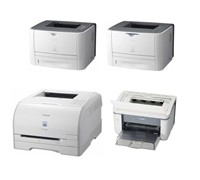
Canon has just released three new mono laser printers and a coloured laser printer that caters to small and medium businesses.


Click to enlarge
The new mono Laser Shot range (LBP-3370, LBP-3310, and 3250) as well as the new coloured Laser Shot (LBP-5050N) claims to minimise paper and overall power consumption, saving money and environmental resources for your business in the process.

Canon Australia’s Brand Manager for Consumer Imaging Product Group, Alyson Barden said, “Small and medium businesses can benefit greatly from the quality prints and stylish look of these new Laser Shot models. Each model is uniquely suited for different office sizes, but the one constant is the ability to create quality output quickly at a reasonable price.”

LASER SHOT LBP-3370

The LASER SHOT LBP-3370 is a mid-range mono printer that claims to offer high-quality prints at 9600 x 600 dpi resolution. It can be shared among small workgroups with its network capability and large print trays, which can hold 300 sheets at once. Canon’s High-speed “CAPT
3.0″ printing technology delivers 26 pages per minute and the ability to print double-sided sheets.

Canon’s On-Demand Fixing System saves power consumption with instant warm up, delivering the first print in only 6.5 seconds. The LASER SHOT LBP-3370 also comes with an All-in-One cartridge system, which combines the drum, toner and waste toner box all in one cartridge.


LASER SHOT LBP-3310

The LBP-3310 claims to print at a rapid speed of 26 pages per minute and offers double-sided prints at 13.3 ppm. It comes with Canon’s On-Demand Fixing System that instantly warms up that unit and delivers the first print in 6.5 seconds.

A gradation control enables a high-definition print resolution of 9600 x 600 dpi, and also features efficient and hassle-free All-in-One toner cartridges and quick start-up for low power consumption.

LASER SHOT LBP-3250

Printing at a resolution of 1200 x 600 dpi and featuring the PC-processing “CAPT” technology, the LBP-3250 produces high-quality prints and allows any small business to work more efficiently in terms of both time and costs.

Key Product Points for the LASER SHOT LBP-3310, LBP-3370 and LBP-3250

  • High-Performance Printing System – CAPT technology works with PC processing power
  • All-in-One Cartridges – combines consumables in one for hassle-free operation
  • Auto duplex (double sided) prints – reduced paper consumption
  • Instant Warm-Up – no waiting for prints, 0 seconds from stand-by mode
  • High-quality prints up to 9600 x 600 dpi – professional results
  • Low Power Consumption and Quick Start Up – saves energy, allows for immediate prints
  • Appealing design – easy to fit in small offices


Click to enlarge
Laser Shot LBP-5050N

This printer will fit small office spaces as it sports a low design and easily to access paper tray. Network capability allows multiple employees to print at once from their work stations. An assortment of paper types, including heavy paper and envelopes, allow for a variety of print projects and creative applications in both colour and mono.

The LBP-5050N claims to have a print speed of 8 pages per minute in colour and 12 ppm in mono, and is equipped to print with resolution of 9600 x 600 dpi.

The LASER SHOT LBP-5050N consumes less energy and reduces carbon emissions by only using 4W power in stand-by mode and comes with an All-in-One cartridge system which combines the drum, toner and waster toner box all in one cartridge.

Key Features of the LASER SHOT LBP-5050N

  • High-Performance Printing System – CAPT 3.0 technology works with PC processing power
  • All-in-One Cartridges – combines all consumables in one unit
  • High-quality prints up to 9600 x 600 dpi
  • Low Power Consumption and Quick Start Up – saves energy, allows for immediate prints
  • Appealing design – easy to fit in small offices

Pricing and Availability

The Laser Shot LBP-3370 (RRP $649), LBP-3310 (RRP $399) LBP-3250 (RRP $199), and LBP-5050N ($449) are available through Canon dealers now.

See: www.canon.com.au

AOC Monitor Cuts Energy Bills

The new AOC monitor will save you money as it claims to use 50 percent less power.


Click to enlarge
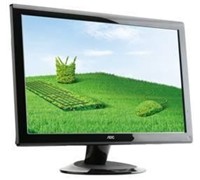
According to the company, the 36 Series uses uses only 50 percent of the power compared to normal operation (when in power-saving mode) without affecting the image quality. This is complemented by the company’s i-Bright technology which reduces backlight CCFL for lower power consumption and reduced mercury levels.

It sports a glossy piano black finish with touch sensitive control keys and comes with 30,000:1(DCR) contrast ratio, 160-degree viewing angle, and USB ports.

The unit also comes with an image ratio control that switches display formats from 4:3 to 16:9 and six display settings (text, Internet, games, movies, sport & power saving mode) to cater to different viewing situations.

The AOC 36 Series is available now with an RRP starting from $199 (18.5-inch).

See: www.aocmonitor-anz.com

Facebook Expands To Oz

Facebook has opened an advertising sales office in Sydney and appointed Paul Borrud as Regional Vice President for Australia and New Zealand.

Paul Borrud will lead the operations and build Facebook’s advertising sales presence in Australia and New Zealand. Borrud was previously responsible for Facebook’s West Coast sales in the US. Prior to Facebook, Mr Borrud worked as the Director of National Sales at Yahoo for the Western Region and managed sales process, implementation, and operations.

Mr Borrud will lead the Australian sales office to provide direct local contact for Australian brands, agencies, companies and businesses, and will build the company’s share of the local advertising market. He will also be responsible for building Facebook’s local team to facilitate the development of marketing campaigns on Facebook.

“We see a lot of opportunity in the Australian market as advertisers look to online media to promote their brands in favour of the more traditional advertising models,” said Mr Borrud.

“With Facebook, businesses have the ability to go beyond simple click-throughs and interact with users through friend networks and all aspects of Facebook including applications and pages,” concluded Borrud.

Trend Micro Cranks Up Channel Dollars For Resellers

Antivirus and internet content security Company Trend Micro has completely restructured their channel operations with the introduction of new support operations new remuneration fees for referrals and additional marketing support for retailers selling their products.

During the past 12 months Trend Micro Australia has grown 20 percent as both business and consumers invest in protection software now the company is cranking up their selling operations in an effort to take on the likes of Kapersky and Symantec who recently launched several new products into the Internet Security market.

As part of the changes, the Australian operation has appointed dedicated Partner Managers; a phone-based channel management support organisation; a new Channel Marketing Manager to help drive marketing campaigns through partners; a new Channel Trainer to ensure engineering teams have up to date skills; and a Priority Technical Support Hotline for partners to receive fast resolution to any technical issues.

The 2009 Trend Micro Affinity Partner Program offers generous margins for all partner tiers as well as a lead referral rebate; a product push rebate; volume rebates; Market Development Funds (MDF); Not for Resale Software (NFR); access to ongoing education sessions and access to newly appointed Trend Micro Partner Managers for top-tier partners.

Trend Micro’s Managing Director for Australia and New Zealand, Dave Patnaik said, “Trend Micro partners will be equipped with the right resources to increase their revenues and profitability during these uncertain times as part of this new world-class Affinity program roll-out.”

The new Trend Micro Affinity Program takes effect immediately for Australian and New Zealand partners, who register through the Trend Micro PartnerWeb Portal. 

Better Business Broadband Plans From Telstra

Telstra has cut prices and simplified its business broadband plans in an attempt to offer better value to small and medium businesses (SMBs).


Click to enlarge

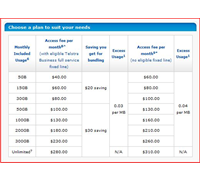
According to the company, all connections are now high speed ADSL where available, excess data charges have been halved and are capped at $400 per month.  Prices are further reduced for customers who also have eligible voice services with Telstra.
 
Telstra Business Executive Director Brian Harcourt said, “We understand how important fast, consistent, business-grade broadband is for small business, which is why we’ve updated Telstra Business Broadband plans to make them simpler and better value.”
 
“Nine out of ten Australian small businesses now regard broadband as an integral part of their day-to-day business, to communicate with customers and suppliers and for buying and selling online.
 
“These new plans give all customers the fastest possible connection while reducing the possibility of bill shock by halving, and capping excess data charges and rewarding customers who also have a fixed service with Telstra Business,” Mr Harcourt said.

The new plans are now cheaper or offer higher download limits, while excess data charges have been halved to 4c per MB or 3c per MB (on plans bundled with an eligible voice service) and capped to $400 a month. In addition, customers who have other eligible Telstra Business fixed line or voice service contracts receive price cuts of between $10 to $30 per month.

Full details of the new plans and pricing are at telstrabusiness.com.

First Review: World’s Slimmest LED Monitor

The BenQ V2420 is a Full HD monitor with LED backlighting. It not only offers excellent images, but can also save you money with its Eco Mode.


Click to enlarge

The glossy black finish of the monitor gives it a classic look. The unit measure 15mm at its thinnest point and the circular base is connected to the body by a thin neck. It comes with a D-Sub, HDMI, and DVI port at the rear, allowing users to connect it to analogue and digital sources.

The V2420H does not have any speakers, although BenQ has included a 3.5mm jack to allow users to connect their headphones or speaker system.

The V2420 has a native resolution of 1920 x 1080, allowing us to enjoy Blu-ray movies in Full HD. Various dark scenes on Close Encounters of the Third Kind looked good, with the monitor being able to display darkly lit areas (found on the last few scenes of the movie) and grey hues without problems. Fast moving scenes were rendered quite well, with the V2420H minimising ghosting.


Click to enlarge

In order to get the perfect picture quality, users would have to manually adjust the settings. If you do not want to fiddle with the settings, BenQ has six proprietary technologies to calibrate picture quality. The Senseye 3 offers six pre-set modes (Standard, Movie, Game, Photo, sRGB, and Eco) that aim to render images that ‘fully accommodates the capabilities of the human eye.’

The Senseye 3 settings work well if you adjust it prior as we encountered instances where text documents were blurry only to find that it was set to ‘Photo’ mode.

Saving energy is another highlight of the V2420H. According to BenQ, this LED screen reduced power consumption by up to 44 per cent compared to CCFL-backlit models. When placed in Eco Mode, the company claims that it reduces power consumption by 71.8 per cent. This makes it the perfect monitor for those who want to save on electricity costs.

Overall, the BenQ V2420H is an LED monitor that not only delivers, but can also save you money. It is available now for $479.

Virtual Conferences Now In HD

IP-based communications provider Commerge is set to provide a Telepresence solution that promises HD video conferencing.


Click to enlarge
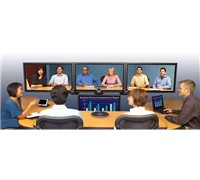
Telepresence is the use of cutting edge HD videoconferencing technology to create an immersive communication experience whereby users in remote locations are given the feeling of being in the same room and sitting on the other side of a conference table.
 
Unlike other Telepresence offerings on the market, the Commerge solution claims to be highly versatile as it allows a user to conduct telepresence meetings, hold regular HD videoconferencing with other standards based systems, and even use the system as a presentation tool for internal meetings. With the ability to connect to legacy standard definition videoconferencing units as well as modern IP based HD systems, the LifeSize technology delivers the best quality picture at any bandwidth.

The Commerge Telepresence offering is an industry standards based system, allowing for interoperability with videoconferencing technology from a broad range of vendors, and without the need for additional costly interfaces.


The system enables users to run the system via their existing Internet connections rather than requiring installation and use of expensive private networks.  The system allows for both IP and ISDN connections within the same call, enabling businesses to connect, communicate and collaborate amongst each other whilst utilising both new and legacy communications networks.
 
Commerge’s Managing Director, Mark Bannenberg said, “Communication and collaboration is core to businesses as they face increasing pressures to reduce costs and improve their environmental impact.  Businesses are searching for high quality and cost-effective ways to engage with colleagues, clients and customers across multiple sites and disparate locations. At one third the cost of similar products on the market, the Commerge Telepresence solution now puts an immersive Telepresence experience well within reach of Australian businesses.” 

See: www.commerge.com.au