Smart Office

LG Phone Shinier The Second Time Around

LG has given its Shine mobile phone a Titanium facelift. The new Titanium Shine looks similar to its predecessor, but does it address the shortcomings of the first model? We take a closer look.


Click to enlarge
Before looking at the TU720 up close, we placed the two Shine phones side-by-side in order for us to find out what changed. We have found the new LG Titanium Shine to be thicker than the older Shine but sports an all-new navigation key, a microSD card slot, and a relocated USB port (now found on the left side). There is also a big overhaul in the phone’s menu as the new Shine is being carried by Telstra, so expect services like Foxtel, Whereis Maps, and BigPond to be available.

This slider phone has a reflective mirror finish and is mostly made out of stainless steel. A volume up and down key, multitasking key that allow you to change between programs, and a camera launch/shutter key can be found on the right spine of the phone, while a microSD card slot and a mini-USB port are located on its left spine. The front hosts a 2.2-inch screen, a VGA camera for video calling, a five way navigation key, and two soft keys for launching the Telstra Mobile Foxtel and BigPond services. Located at the back of the unit is the TU720’s 2 Mega Pixel camera with flash that can be used for taking photos or shooting videos.


Click to enlarge
Performance:

Sliding the phone open reveals a cramped, flat, and stiff keypad, making it difficult for users (especially ones with fat fingers) to press the buttons. However, it is good to know that LG has changed the jog dial into a five-way navigation key, making it easy for users to browse through the main and sub menus. Pressing the navigation key brings you to the main menu, while moving the key in each direction (up, down, left, and right) launches the My Place, Contacts, Mailbox, and Inbox applications, respectively.

The main menu consists of My Stuff (Graphics, Video, Audio and Ringtones, Music Player, Games, Applications, Bluetooth Files, Other Files, and Memory Card), Recent Calls (Missed Calls, Dialled Calls, Received Calls, All Calls, Call Duration), Messaging (New Message, Inbox, E-mail Inbox, Drafts, Outbox, Sent, Voicemail, Videomail, Templates, Message Settings), My Place (BigPond, Foxtel, Yellow Search, BigPond Music, My E-mail, Call 1234 Info, Whereis Maps, BigBlog and Photos, Downloads, and My Account), Address Book (Contact List, New Contact, Caller Groups, Speed Dial List, Copy/Move/Delete Contacts), Tools (Alarm Clock, Calendar, Tasks, Notepad, Calculator, Tip Calculator, Unit Converter, World Clock, Stop Watch, Date Finder, D-Day Counter),  Camera and Recordings (Take Photo, Record Photo, Record Voice), and Settings. Navigating through the sub-menus is fairly easy as the options are all lined-up in a list. The only problem we have encountered while navigating through the sub-menus is the constantly-changing back/cancel button.

The TU720 that we received connects to the Telstra network, giving users HSDPA and 3G functionality, Foxtel Mobile and BigPond services, as well as other Telstra services. We have tested the Foxtel Mobile service and have found the LG Titanium to stream videos with minimal buffering time. The Internet connection was quick – web pages loaded in a matter of seconds and attached files were uploaded without any problems.


Click to enlarge
The TU720’s 2 Mega Pixel camera comes with a built-in LED flash that can brighten shots taken in the dark, has several ‘advanced’ options like White Balance adjustments, Colour Effects (Sepia, Mono, Negative, and Colour), and adjustable Resolution settings (320×240, 640×480, 1280×960, and 1600×1200). The outdoor photos (and some indoor shots) we took were often overexposed, leaving us with some loss of detail. In order to ‘fix’ this problem, one must either use a photo editing software, or manually adjust the White Balance settings.

A user can also record interviews or create voice messages with the voice recording software, listen to audio tracks with the phone’s music player, pair to various devices using Bluetooth, and even use the phone as a modem using the USB cable. The 140MB internal memory of the phone can be increased to 4GB (via the microSD card slot), but users would have to purchase it themselves as LG did not bundle any microSD card with the package.

Finally, LG claims that the 900 mAh Lithium-Ion battery for the TU720 has a Standby time of 250 hours, a Talk time of 180 minutes, and a Video Talk time of 130 minutes. Just remember that using this phone to watch Foxtel, listen to music files, and/or connect to the Internet will give you a shorter battery life.


Click to enlarge
Conclusion:

The LG Shine LU720 is a chic phone that provides users with an abundance of phone features, access to online content such as Foxtel and BigPond, and even allows video calling between mates. This Titanium phone got what’s good from its older sibling, improved on it, and now shines brighter than before.


Product Specifications:

Phone Type: Slider
External Display: 2.2″ LCD
Number of Colours: 262K Colour TFT
Internal Memory: 140MB
External Memory: microSD card (optional)
 
Data Connectivity
USB: Yes
Bluetooth: Yes
PC Sync: Yes

PIM
Organiser/Calendar: Yes
Alarm: Yes
Phonebook: 500

Advanced Features
JAVA: MIDP 2.0
MIDI: Yes
Keytone Effect: Yes
Camera: 2 Mega Pixel
Camera Flash: Yes
Camera Zoom: Up To 4x
Videotalk: Yes
VOD: Yes
Multimedia Player: MP3, WAV, AAC, WMA, MPEG4, JPG, BMP
Voice Recording: Yes
Speakerphone: Yes

Standard Battery: 900 mAh Li Ion
Standby Time: 250 hours
Voice Talk Time: 180min
Video Talk Time: 130 min

Dimensions: 99.8 X 50.6 X 15.08 MM
Weight: 122g

————————————
LG Black Label Series: Shine Titanium (TU720) | $829 |  | au.lge.com

For: Better than its predecessor; New and improved navigation keys; A lot of features; Expandable memory using microSD card
Against: No included memory card in the package; Keypad is still cramped; Photos tend to be overexposed; Shiny surface is a magnet for fingerprints
Conclusion: A ‘shiny’ phone with a lot of features.
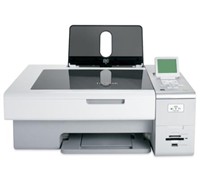
Wireless All-In-One Printers From Lexmark

Lexmark has launched two full-featured wireless all-in-one (AIO) printers that the company claims will deliver wireless connectivity, two-sided printing, and ease of use.

Mark Oakey, Product Marketing Manager for Lexmark, mentioned that its goal is to provide an affordable printer that is easy enough for customers to use. Since Lexmark’s new all-in-one printers have wireless capabilities, users who have a wireless network set-up in their home or office may be able easily connect to the printer without the need for wires.

Lexmark has also included features like photo printing, memory card slots, scanning functions, and even an LCD screen for using the unit without the need for powering up the PC. And in order to promote a cleaner and greener environment, its printers have the ability to print in both sides of a paper, comes with a Lexmark toolbar software that allows a user to print text without photos in websites, and even offer free cartridge recycling with the addition of a post paid recycling bag.


Click to enlarge
Lexmark’s X4850 All-in-One printer

Lexmark’s Executive Vice President and Head of Consumer Printer Division, Paul Rooke said, “Lexmark’s new all-in-ones deliver business-class productivity with the added advantages of wireless to help busy professionals get more done quickly, easily and affordably.”

Lexmark X6570 Wireless All-in-One

The Lexmark X6570 Wireless All-in-One is a wireless four-in-one printer that has wireless connectivity and also has features such as two-sided printing, fax, an automatic document feeder for copying and faxing, and photo printing.

The Lexmark X6570 has the following features:

  • Scan, fax and access media card slots wirelessly
  • Offers print speeds of up to 28 pages per minute (ppm) black and 24 ppm color
  • A 48-bit flatbed color scanner
  • Photo capabilities, such as scan-back photo proof sheet and optional six-color printing
  • PictBridge port
  • Lexmark evercolor2 inks
  • Lexmark Toolbar

Lexmark X4850 Wireless All-in-One

Lexmark is also offering the X4850 Wireless All-in-One for SOHO professionals who want to have a wireless printer that can print text documents and can handle photos as well.

The X4850 has the following features:

  • Scan, fax and access media card slots wirelessly 
  • Two-sided printing 
  • A 2.4-inch color LCD display for photo viewing 
  • Memory card slots and PictBridge port 
  • Borderless printing
  • Lexmark evercolor2 inks

Availability and Pricing
The Lexmark X6570 and X4850 will be available starting this month with an RRP of $299 and $249 respectively.

See: www.lexmark.com

Australians To Buy One Million Tablets In 2011

Telsyte is predicting that over one million tablet devices will be sold in Australia in 2011 as more content, updated software and better hardware become available.


Click to enlarge

The company said that a number of factors including the push for more media tablet apps, rapid cannibalisation of other markets, increase in features, decrease in price and greater familiarity amongst consumers will drive the sales of tablets next year.

Apple is expected to remain the leader in the market with a 60 percent share next year (down from 90 percent in 2010), while Android devices are expected to have 35 percent market share in 2011.

In addition, Telsyte estimates that around 400,000 Australian consumers will be using a media tablet by the end of 2010, with approximately a quarter sharing a device. The company estimates that around 20,000 Australian businesses have purchased at least one media tablet for their organisation.

Telsyte also forecasts the media tablet market to grow from $292 million in 2010 to $1.35bn in 2014.  

Telsyte Research Director, Foad Fadaghi said, “The Australian media tablet market is poised to explode. Media tablets are an industry transforming device with implications for hardware vendors, media organisations, software companies and telecom carriers.”

Video Streaming Chews Biggest Mobile Bandwidth

Allot Communications reported that mobile data bandwidth usage increased by 68 percent during the first half of 2010. This is due to users streaming videos and checking social netowrking sites on their mobile phones.
According to its MobileTrends Global Mobile Broadband Traffic Report, video streaming applications continue to dominate the global mobile bandwidth scene and remain the largest consumer of bandwidth with a 35 percent share.  Web browsing had a 29 percent share in mobile data usage while P2P and HTTP download represented 31 percent of global mobile bandwidth.

In addition, video streaming is the single largest growing application type with a 92 percent increase, due in part to the ever-rising popularity of YouTube.  The report also found that Twitter grew its bandwidth usage by 310 percent while Facebook increased its dominance with a 200 percent rise.

VoIP and IM applications grew significantly during this period becoming the second fastest growing traffic-type. Skype has continued to dominate this segment increasing its share of the global VoIP bandwidth from 77 percent in H2, 2009 to 83 percent in H1, 2010, leaving competitors like Google Talk, Yahoo Messenger and Windows Live Messenger behind.


However, Yahoo Messenger is still the most popular IM application, accounting for 29 percent of global IM bandwidth, even if its bandwidth share has reduced since the second half of 2009.

Allot Communications’ President and CEO, Rami Hadar said,  “The results of our latest MobileTrends Report reinforces that mobile broadband operators continue to face growing challenges as subscribers demand real-time content through an array of smartphones and Internet devices.”

“The findings also clearly demonstrate the close ties between mobile broadband and social networking. Whether it’s YouTube, Twitter or Facebook, social networking via mobile devices is becoming a ‘must have’ for subscribers and we expect that this is just the beginning,” added Hadar.

The Allot MobileTrends Report data was collected from January 1 to June 30, 2010 from leading mobile operators worldwide with a combined user base of 190 million subscribers. Allot gathered the data using the long term reporting capabilities of Allot NetXplorer, Allot’s centralized management and reporting system. The length of the collection period allows accurate identification of usage trends and patterns, reducing the influence of temporary events in the monitored networks.

Dell Offers BigPond Wireless Broadband To Customers

Dell has announced the addition of BigPond Wireless Broadband to its integrated mobile broadband options.


From today, Dell will offer 13 notebook models with the capability to access BigPond Wireless Broadband built-in and plans starting from $34.95 per month.

Client Computing Strategist for Dell, Jeff Morris says that this move by Dell is in response to direct customer feedback. “Dell is known for giving customers the ability the tailor what’s inside their notebook – we’ve recently given consumers the ability to choose the colour as well.  That flexibility extends to being able to use your Dell notebook online in more places too.”

“Our build-to-order capability gives us the flexibility to do this at our factory and deliver to each customer a bespoke system tailored just the way they want.  We’ve worked closely with BigPond to make the wireless broadband experience simple, easy to buy and to use,” Morris said.

BigPond Group Managing Director, Justin Milne said, “Fire up your new notebook, run the connection manager, pick a plan, and you’re online.”

Pricing and Availability

The following models are available today with BigPond mobile broadband plans starting from $34.95 per month on a 12-month plan (for details see
www.dell.com.au/mobilebroadband):

  • Latitude D830, ATG 630, D630 and D430
  • Precision M4300
  • Inspiron 1420, 1520 and 1720
  • Vostro 1400 and 1500
  • XPS M1730, M1530 and M1330

See: www.dell.com.au

New Affordable Projector From BenQ

BenQ aims to make projectors more affordable with the launch of the MP511, a 2000 ANSI lumens DLP digital projector that has an RRP of just $999.


Click to enlarge
This new projector replaces the very successful MP510 and claims to have a better overall performance and increased brightness, the company says.

Managing Director of BenQ Australia, Phil Newton said, “Once again we are breaking new ground with the MP511, its astonishing to imagine the average person can afford an image up to 300-inches with this level of brightness in a DLP projector, we really have made projectors attainable to the masses. This truly is a unique beast and we are thrilled to be able to crack the $1,000 barrier with such a well equipped product.”

BenQ claims that its MP511 offers 2000:1 contrast ratio, native SVGA resolution, and numerous inputs including Analog RGB, Component Video, S-Video and Composite Video. The MP511 also features “Brilliant Colour” a unique picture enhancement technology that vastly improves the overall picture performance, “Wall Colour Correction” a clever bit of processing that enables the user to adjust the image colour depending on the colour of the wall that’s being projected, and a 3D colour management which allows independent colour adjustment. The MP511 also includes 11 preset application modes, presentation timer and panel keylock for security.

RRP: $999

See: www.benq.com.au

iiNet Tech Support Line For Mac Users

Internet service provider iiNet is providing a dedicated Apple Macintosh support line for users who are having problems with their iiNet internet connection.

iiNet Chief Operating Officer, Mark White said that its ability to offer current and future Mac user customers a dedicated support line was due to the growing number of iiNet customers using Macs. He also ensured that the support team is capable enough to guide users every step of the way.

“Our specialist Mac Support Team has undergone a training program designed by Apple, and is dedicated to teaching effective troubleshooting for our Mac users. Each member of the Support Team has access to a range of live Mac computers and Operating Systems, to enable a faster, more individualised and accurate response. Our tech support line has seen around 5% of callers opting for the Mac support option. The percentage of iiNet customers that use Macs is higher than ever before – they currently represent around 10% of our customer base and we expect our Mac user numbers to increase in the near future,” he added.

See: www.iinet.net.au/mac

Be Seen With Mitsubishi LCD Screen

The new line of commercial LCD displays from Mitsubishi Electric allows a user to control several displays from a single location with its Ethernet transmitter and receiver.

The 52-inch MDT521S comes with a CAT-5 transmitter/receiver pair that allows both video and control signal data to be transmitted over the same network cable.

According to the company, the CAT-5 connectivity supports Full HD signals over a tested 150 metres. Up to five displays can be daisy-chained over a distance of 200 metres. The CAT-5 connection is also available as an option for the MDT421S.

Using the standard VGA connection, up to 25 displays can be combined to create a single large video wall, with frame compensation taking into account the bezel widths. The displays can be installed in landscape, portrait or full face-up positions.

Mitsubishi Electric Australia’s National Manager of the Visual Information Systems Department, Stuart Baker, said, “In large locations such as airports, shopping centres or high rise buildings, it can be difficult to have several displays controlled from a central location. With the MDT displays however, this type of installation becomes much easier to achieve.”


Other features include twin ambient light sensors allowing the displays to automatically and accurately adjust brightness to suit any environment. Colour matching is also a key feature with 6-axis colour adjustment allowing users to adjust the hue and saturation of red, green, blue, magenta, yellow or cyan independently.

Mitsubishi Electric optional Colour Match software, when used in conjunction with an external analyser can quickly and easily colour match any display wall with just the press of a key.

The MDT range also includes the standard features found in all Mitsubishi Electric commercial LCD displays, such as power and input scheduling, a screen saving function to prevent image retention, and PinP/PoutP modes. The MDT models come with a remote control with discrete input switching. Optional speakers, display feet and a silver bezel are also available.

The Mitsubishi MDT421S and MDT521S are available now for $3990 and $8990, respectively.

Epson Rolls Out New Office Printers

Epson has launched four new multifunction and single function inkjet printers with wireless and fax capabilities, as well as speedy print, copy and scan speeds.

The Epson Stylus Office TX600FW, TX300F, T40W, and T30 are business-focused printers that provide connectivity and communication, along with printing, scanning and imaging output tools for home office users.

According to Epson, the new printers use Epson’s improved DURABrite Ultra resin coated pigment ink in individual ink cartridges to lower ink costs and produce photos and documents that last up to 120 years on selected Epson paper. The Epson DURABrite ink is resistant to water and smudging, produces sharp detail in text and images on a wide variety of papers, and enhances photo glossiness by up to 50% on selected Epson papers.

And Epson’s Stylus Office printers accept a wide variety of media types from coated glossy photo papers to heavyweight matte paper and pre-gummed envelopes.

The Office TX600FW and Office T40W are equipped with the new generation Epson MicroPiezo print head with ink repellent coating that delivers 5760 x 1440 dpi print resolution and graphics A4 prints at 27 pages per minute in black and 19 pages per minute in colour (38 ppm black and colour in draft mode).


The Office TX600FW and Office T40W have high volume ink cartridges for long print runs, and the Office TX600FW has a 30 page automatic document feeder for increased office productivity.

Both the Office TX600FW and Office T40W have integrated Ethernet/wireless connections for shared printing, and the Office TX600FW has an inbuilt black/colour fax. The Office TX600FW also has built-in card slots that will read most popular storage card types, and all the Stylus Office range has a Hi-Speed USB port compatible with USB 2.0.

The Epson Stylus Office TX300F is an entry level home office and small business multifunction printer with a 30-page automatic document feeder and colour fax capability for enhanced productivity.  It has an optical resolution of up to 2400 dpi and prints and copies at up to 31 A4 pages per minute in draft.  The Office TX300F will also copy high resolution colour photographs directly to Epson glossy photo paper to create borderless prints.

The Office T30 is an entry-level A4 all-purpose single function inkjet printer that produces high quality photos and laser quality documents for the office at up to 27 black and white A4 pages per minute and up to 11 colour A4 pages per minute (up to 38 pages per minute in draft mode).

Availability and Pricing:

The new Epson Stylus Office line will be available starting this month with the following RRP:
– The Epson Stylus Office TX600FW: $249
– Epson Stylus Office TX300F: $149
– Epson Stylus Office T40W: $149
– Epson Stylus T40W: $149

See: www.epson.com.au