Smart Office

$899 Medion Notebook Packed With New Features

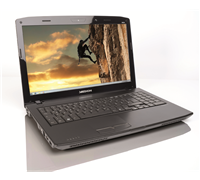
Medion has been delivering value notebooks for the longest time and it is no surprise that their new 15.6-inch notebook packs a lot of features for $899. If you are in the market for something portable, then go to your nearest Aldi store next week.


Click to enlarge

Medion still maintains the brushed aluminium finish on the lid and the matte interior for the MD98390, which gives it a sophisticated look. The keyboard is well-spaced and has a dedicated number pad, making it easy for users to do their accounting or expenses while on the go. The touchpad is placed a bit off centre and offers multi-touch functions such as pinch to zoom and two finger scrolling.

Users who are used to connecting a lot of devices via USB will not be disappointed – the notebook has three USB 2.0 ports. Early adopters who already have a USB 3.0 device are also catered for as Medion also included a USB 3.0 port for fast data transfer.

We connected a WD My Passport Essential with USB 3.0 to the MD98390 and found that it was able to transfer a 2.16GB folder to the Desktop in 70 seconds (averaging about 35MB/s) compared to about 115 seconds on USB 2.0 (about 20MB/s).

Users can find the MMC/SC/MS/MS Pro card reader, microphone and earphone jacks, and DVD drive with burner on the right side of the notebook. It also has a web camera and built-in microphone that can be used for video chat programs such as Skype.


Click to enlarge

The 15.6-inch LED backlit screen has a native resolution of 1366×768 and doesn’t sport a glossy finish. Those who want to do their work on a bigger screen can hook it up to a secondary monitor or large screen TV using the VGA or HDMI port. Movies played on the unit were good when watched up front but quality suffered when looking at it from an angle. We also saw a couple of instances when fast moving sequences suffered from tearing.

The Intel Core i3 M370 processor running at 2.40Ghz and 4GB of RAM allowed us to run multiple programs at once without experiencing slowdowns. The notebook also came with a 640GB drive that allowed us to store a lot of movies, photos, pictures, and even documents.

The unit is pre-installed with Windows 7 Home Premium (32-bit) and comes with programs such as  Bullguard (Trial), CorelDraw Essentials 4,Cyberlink Media Suite, Ashampoo (Burning Studio, Photo Commander and Snap), as well as Microsoft Office 2010 that offers Word and Excel for free, but includes advertising.

The Nvidia GeforceGT 425M (1GB) video card comes with Optimus Technology that claims to automatically ‘figure out how to best optimize your notebook computing experience’. In a nutshell, Optimus Technology is able to extend the battery life of a notebook when a user is surfing the Internet or sending e-mails and automatically switches to performance mode when watching HD movies or playing games.


While the MD98390 is able to play older games, it is important to note that newer games are no-go. The notebook gathered a score of 7115 in our 3DMark06 test.

The unit lasted for 2 hours and 40 minutes during our DVD playback test, with the speakers and Dolby Advanced Audio being able to produce clear mids and punchy bass. This means that users will be able to do a lot of things before having to plug the device to an outlet.

Overall, the Medion MD98390 comes with a lot of new features that make it worth the money. It will be available next Thursday for $899. 

Asus Puts The Smart In Smartphone

Businessmen who are constantly out of the office will need a smartphone that can retrieve e-mail in an instant, is easy to use, and has a lot of office applications. The new Asus M530w seems to put all that’s needed in the palm of your hands.


Click to enlarge
The Asus M530w is a smartphone that does not feel ‘cheap’ despite being made mostly out of plastic. Up front, it sports a 2.4-inch 65k colour TFT-LCD (320 x 240 pixels), a secondary camera for video calling, five-way navigation keys, left and right soft keys, home and back hotkeys, start and end call keys, and a QWERTY keypad for easy text input.

Users can find the jog-dial and the Earpiece volume key on the unit’s left spine, while a camera shortcut key can be found on its right. In addition, a 2.5mm headphone jack and a mini-USB connector for charging and synchronising the unit can be found at the bottom of the unit. At the back of the unit, users can find the 2 Mega Pixel sensor, built-in flash, speakers, and battery compartment that hold the SIM card and microSD card.


Click to enlarge
Performance:

The Asus M530w uses a MarvellPXA270 416MHz processor and runs on Windows Mobile 6 Standard version. While this phone does not have touchscreen functions for input, its integrated QWERTY keyboard and navigation keys made text input and scrolling through the interface of the operating system easy.

Asus has included quite a number of applications on its M530w which can help businessmen who are always out of the office. One can surf the Internet with the M530w’s Internet Explorer program, check or create appointments with the Calendar function, compress files with the Spb Zip program, and chat with business contacts with the Windows Live Messenger program.

Also present is a Remote Presenter program that allows a user to wirelessly control presentations using the M530w, a Wildcard Mobile application that uses the camera to take snapshots of calling cards and saves the contact details to the phonebook automatically, and view office documents on the go with its Excel Viewer, PDF Viewer, PPT Viewer, and Word Viewer.


Click to enlarge
Users can also listen to their music and video files as this smartphone is capable of playing MP3, WMA, AAC, WAV, and MIDI files, as well as MPEG4 and AVI files. The unit is also capable of streaming videos by connecting to a streaming server and record video files with its video camera functions.

The Asus M530w also supports various mail server systems like POP3, IMAP4, Microsoft Exchange, and even Blackberry 4.0, allowing users to stay connected and updated with home and/or work e-mails. And with 3G capabilities and 802.11 b/g wireless connectivity option, users can easily download data with minimal waiting time.

Finally, the Asus M530w lasted less than a day during our tests (with Wi-Fi and Bluetooth on), so ‘heavy’ users must always bring their charger in case the batteries run flat. A longer battery life (of two to three days) is possible though, just so long as users use the programs sparklingly.


Click to enlarge
Conclusion:

The Asus M530w is a business smartphone that is slim, light, and is easy to use. The phone’s quick loading times, office-oriented programs, 3G capabilities, and Wi-Fi connectivity certainly gives it an edge when compared to other smartphones available in the market today. However, Asus must definitely do something about the unit’s abysmal battery life in order to appeal to businessmen who want to stay connected 24/7. Nevertheless, for those who want a smartphone packed with features (but don’t mind the short battery life), then the Asus M530w may perhaps be what you are looking for.

Product Specifications:

  • CPU: Marvell PXA270 (416MHz)
  • Operating System: Microsoft Windows Mobile 6 Standard
  • Colour: Black / White
  • Display: 2.4-inches TFT, 65k colours, 320 x 240 Resolution
  • Network System: Tri-Band GSM/GPRS (900/1800/1900); WCDMA (UMTS) (2100MHz);GPRS Class 10
  • Connectivity: WLAN 802.11 b/g, USB 1.1, Bluetooth 2.0
  • WAP: HTTP/ WAP 2.0
  • Messaging: SMS, MMS 1.2, and E-mail
  • Memory: Built-in 256MB Flash + 64MB SDRAM
  • Expansion Slot: microSD card
  • Camera: 2 Mega Pixel with support for Auto-Macro function and VGA camera for video calling
  • Java: J2ME (CLDC 1.1 + MIDP 2.0)
  • Audio: MP3, WMA, AAC, WAV, and MIDI
  • Video: MPEG 4/ H.263 Playback and Recording/Audio/ Video Call / Video Streaming
  • PIM: To-do-list, Organiser, World Clock, Calculator, File Manager, MSN
  • Business Features: ClearVue Document Viewer, Bluetooth Presenter, and Business Card Recognition
  • Battery: 1200 mAh Lithium-Ion
  • Talk Time: 4-5 hours (GSM), 2-3 hours (WCDMA)
  • Standby Time: 150 – 200 hours
  • Dimensions: 117 x 65 x 13.8mm
  • Weight: 135g

————————————
Asus M530w Smartphone | $899 |  | au.asus.com

For: Slim profile; Construction; Keyboard layout; Office-oriented applications; Wi-Fi connectivity
Against: Abysmal battery life; microSD card slot not hot-swappable
Conclusion: The M530w could have been a solid smartphone if it wasn’t for its poor battery life.

Apacer New MiniSDHC Card Launched

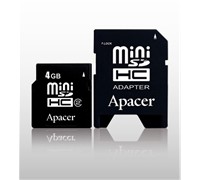
Apacer addresses the need of consumers who store videos, pictures, music files, and even e-mails on their mobile phones or hand-held devices, with the launched of its 4GB miniSDHC memory card.


Click to enlarge
Apacer claims that its new 4GB miniSDHC memory card supports any equipment that uses SD2.0 memory cards, such as Nikon 80D, Casio Exilm-Z1000/Z600/S600, Panasonic DMC-L1 digital cameras, and even Panasonic’s SDR-S200 digital video cameras.

The Apacer miniSDHC 4GB is also equipped with an Error Correcting Code (ECC) feature that automatically detects and corrects errors, as well as Apacer’s Wear Leveling Technology that greatly extends the life of the product, the company says.

Pricing:

Apacer miniSDHC Card 4GB: $77

See: http://www.bluechipit.com.au

Macquarie Involved In Small Business Telco Scam

Macquarie Bank has been accused of being involved in deceit and trickery by bundling televisions, notebooks, phones, and other electronic goods into contracts that have hit small business with tens and thousands of dollars in fees.
The head of the ACCC, Graeme Samuel has told the ABC1’s Four Corners program that he attempted to negotiate with the CEO, Nicholas Moore, but was rebuffed. He described it as like hitting ‘a brick wall.’

According to an ABC News report by Stephen Long, Macquarie is a major financier of deals for “telephony bundling” which involves selling telco services with other ‘free’ items such as notebooks, televisions, and other electronic goods.

However, as soon as businesses sign up with a telco, they will be hit with tens and thousands of dollars in fees for the supposedly ‘free’ equipment that they received.

Four Corners says that it has found evidence of fraudulent or doctored contracts, forged signatures, and finance companies directly debiting money from people’s bank accounts without authorisation. It has also found that whistleblowers were taught to hide the presence of rental contracts for the equipment and to trick people into signing the deals while maintaining the equipment was ‘free’.

Graeme Samuel told ABC’s Stephen Long that what small businesses don’t realise is that as soon as they sign with the telco, they are also signing with a finance company.

“We’ve found far, far too many – literally hundreds if not thousands of small businesses have been caught by these sorts of arrangements,” Mr Samuel told Long.

Mr. Samuels has approached CEOs from various finance companies and asked them to hold off pursuing small business through the courts but was rebuffed. 

Fastest Telstra Mobile Broadband Now Available For Consumers

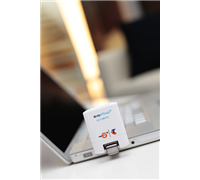
Telstra announced that its BigPond Ultimate USB is now available to the wider consumer market. This will allow any user to surf the Internet and download files at very fast speeds.


Click to enlarge

Previously available only to selected corporate and SME customers, the company says that the device is twice as fast as Telstra’s current fastest Next G modem and offers coverage in Australia’s capital city CBDs and associated airports, selected metropolitan hubs and more than 100 regional centres.

The benefits of the new Telstra BigPond Ultimate USB Modem include typical download speeds range from 1.1Mbps to 20Mbps in selected areas and coverage availability in Australia’s capital city CBDs and associated airports, selected metropolitan hubs and more than 100 regional centres.

The Telstra BigPond Ultimate USB Modem is available for $0 upfront on a range of Post-Paid Mobile Broadband plans, when customers sign up to a 24 month contact.

Additionally from today, customers on Telstra’s high-end BigPond Mobile Liberty plans will enjoy more value: 7GB for $59.95 (an additional 1GB for $20 less per month on the previous 6GB offer) and 12GB for $89.95 (an extra 2GB for $30 less per month on the previous 19GB offer).

New All-In-One Printer From Epson

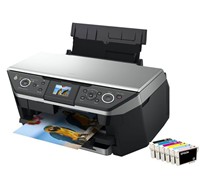
Want a printer that can do it all? Epson has unveiled its Epson Stylus Photo RX690 all-in-one photo printer which the company claims to be ideal for home, home offices and small offices that require regular document and photo printing, scanning, copying and CD/DVD printing.


Click to enlarge
With speeds of up to 40ppm and borderless 4×6 inch photo printing in as little as 12 seconds, the Epson Stylus Photo RX690 increases the efficiency and productivity of your home or business environment, offering complete document management with dual paper trays for greater paper storage capacity and optional duplexing for double-sided printing to reduce paper usage, the company says.

The Stylus Photo RX690 uses Epson Claria photographic ink and for prints with richness, depth and clarity. The Claria’s dye-based formulation boasts exceptional light reflection characteristics to ensure your prints have superior colour vibrancy. And when combined with genuine Epson photo paper, the memories can last hundreds of years.

The Stylus Photo RX690 has six individual Intellidge colour ink cartridges, so consumers replace only the ink cartridges that are used for cost effective printing. In addition, Epson PhotoEnhance enables consumers to produce the optimum print every time by automatically adjusting the colour balance to allow for the different requirements of portraits, landscapes or groups. PhotoEnhance also includes PortraitEnhance to detect faces in the image and enhance face definition and skin radiance to ensure beautiful, natural skin tones.

The Stylus Photo RX690 is capable of PC-free photo printing, copying and scanning with a 2.5 inch high resolution tilt-adjustable LCD viewer for added ease of use with simple, intuitive menus offering easy viewing, selecting, copying and printing of photos without a computer. It also has PictBridge and card slots compatible with many popular memory card formats.

Included with the Stylus Photo RX690 is a USB cable for immediate out-of box use.

The Epson Stylus Photo RX690 RRP is $399 and is available for purchase at consumer electronics retailers, computer superstores, mass merchandisers and office superstores.

See: www.epson.com.au

New Apple App And Products For Qantas Members

Qantas has announced that it will now offer new Apple technology in Qantas Clubs across Australia.This means that a new range of Apple technology including the latest generation Macs implemented across all Australian Qantas lounges, moving the lounges to an all Apple environment.

Qantas CEO, Alan Joyce said, “We are launching Sydney Qantas Lounges with the new technology from today, Adelaide, Brisbane, Canberra, Melbourne and Perth from November and Alice Springs, Cairns, Darwin, Hobart and Townsville from December.”

“This is only the start of our Apple offering as Qantas continues to develop further innovative initiatives utilising Apple technologies for Qantas Club members and Qantas Frequent Flyers,” added Joyce.

In addition to the Qantas Lounge offering, Qantas has also today launched a new Qantas Frequent Flyer iPhone App which is designed to help members explore the many ways they can earn and use points.

The Qantas Frequent Flyer iPhone App is available to download for free from the App store on iTunes.

Toshiba USB Docking Station Hits Oz

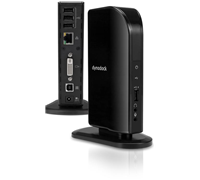
Displaylink and Toshiba are bringing the dynadock V to Australia. This universal USB docking station claims to link various devices to a PC with one cable.


Click to enlarge

Using DisplayLink’s unique silicon and software solution, users can plug the Toshiba dynadock V – USB Mini Port Replicator into any PC or notebook with a single USB cable.

The dynadock V comes with a built-in HD Digital Video card to connect an extra VGA or DVI monitor with resolution up to 1920x 1080. The dynadock V also allows a user to view up to three displays simultaneously, add a full sized keyboard, mouse, speakers, printers, external hard drives, and even Ethernet.

DisplayLink’s Senior Vice President of Marketing and Business Development, Dennis Crespo said, “Toshiba is a world leader in mobile computing technology, and this alliance will give DisplayLink an entry into the important Australian market. We look forward to working with Toshiba to offer Australian customers a quick and easy way to enjoy a desktop-like experience from the notebook, easily connecting multiple monitors and organising all USB peripherals.”

Toshiba’s Product Manager for Notebook Accssories and Storage Devices, Phil Daidone said, “The dynadock V universal docking station has a full set of features in a compact, affordable package. It is the ideal computing companion for consumers and business travelers alike who wish to get the best productivity from their notebook investment.”

The dynadock V is available now with DisplayLink technology at leading Australian retail locations.