Smart Office

Huawei Future-Proofs Mobile Broadband Dongles For LTE On The Horizon

Chinese telecommunications technology company Huawei has globally introduced the world’s first LTE wireless broadband dongle which supports multi-modal internet access across 2G, 3G and 4G networks.The E392 is a USB data card that supports LTE TDD technology while still remaining backwards compatible with UMTS/DMS/CDMA networks, automatically switching between different applicable networks for optimum performance.

With LTE networks, standing for Long Term Evolution, still being a distant picture for major telecoms in Australia, the device acts as future-proof piece of equipment.

Huawei has trialled LTE technology with vividwireless, Vodafone and Telstra, and is currently rolling out Vodafone’s new mobile network that will later include LTE across about 8,000 sites across Australia.

“The introduction of the Huawei E392 will bring super-fast internet connectivity to users worldwide and accelerate the global development of the LTE TDD industry,” said President of Mobile Broadband for Huawei’s device division, Wu Shimin.

The E392 supports download speeds 20 times higher than existing 3G networks at up to 100Mbps. The device will become commercially available some time in this year’s third quarter.

Kingston Takes On USB 3.0 Standard With Fastest Thumb Drive

Kingston has upped the ante on its flagship thumb drive by upgrading the USB 3.0, which it says is the new standard, making the DataTraveler Ultimate its fastest USB stick.

Now marked as the memory-specialist’s fasted USB 3.0 flash drive, the DataTraveler Ultimate 3.0 G2 is the typical USB thumb drive on steroids, with Kingston upping the transfer speeds in the same small profile as the last generation.

The specs are all the same as the last gen – it’s still a bit hefty when up against other USB sticks, measuring up to 73.7 x 22.2 x 16.1mm and stocking in the same 16, 32 and 64GB sizes – though this unit realises the potential of its USB 3.0 adapter.

While the original DataTraveler Ultimate hit USB 3.0 data transfer rates of up to 80MB/sec reading and 60MB/sec writing, the second generation tops at a 100MB/sec read and 70MB/sec write speed.

It’s also backwards compatible with USB 2.0 ports, so the versatility is there. But while it backs USB 2.0, Kingston is looking to USB 3.0 as the new standard in connectivity.

“Kingston is committed to help drive market adoption of the new USB 3.0 standard and make it more accessible to the mass market,” says Kingston’s director of Flash Memory sales, Nathan Su.

Kingston touts the reliability of the high performance USB by slapping on a five year warranty.

The DataTraveler Ultimate USB 3.0 G2 sells for $60 for 16GB, $90 for 32GB, and $155 for the top 64GB model.

NEC Upgrades Its Regional Network On Back Of NBN Roll Out

NEC has announced a ongoing upgrade to its networking and broadband delivery networks for regional Australian businesses on the back of the government’s bid to eliminate coverage blackspots as it rolls out the National Broadband Network (NBN).NEC is upgrading its regional Digital Subscriber Line Access Multiplexer (DSLAM) and Multiprotocol Label Switching (MPLS) core networks to increase speeds and bandwidth to a wider area across the country with support for voice, data and video services.

The expansion of the company’s Nextep network comes in with the help of the Federal Government’s ‘Regional Backbone Blackspots Program’ that sees the government fork out $250 million in investment to improve broadband services in more remote areas.

NEC’s upgrade will see 62 new DLSAMs installed across five of these ‘backbone’ links, with three so far operational. The final two are set to be completed by year’s end.

Kingston Goes Wireless With Wi-Drive Wi-Fi Apple iDevice Storage

Flash memory specialist Kingston Digital has taken its storage wireless with a Wi-Fi-linking portable media server purpose-built for streaming to multiple iOS devices at a time.The 86 gram drive is topped up with files and media content when hooked up to a PC or Mac via USB. An access point name and password is configured, and the Wi-Drive is ready to go.

Apple device users running iPads, iPhones or iPod Touches (running versions of iOS 4.2.1 and above) download the Wi-Drive App from the App Store, connect to the Wi-Drive through the app and can then manage and share content saved onto the drive across iOS devices.

The drive is supported wirelessly by its integrated 802.11n Wi-Fi and can run up to four hours on a single charge. Kingston claims that three users can simultaneously work on the drive with different file types without disrupting performance.

The drive has a limited array of supported files as an Apple-centric product, compatible with the files listed below:

Audio: AAC, MP3, WAV
Video: m4v, mp4, mov, Motion JPEG (M-JPEG), AVI
Image: jpg, bmp, tiff
Document: pdf, doc, docx, ppt, pptx, txt, rtf, xls

The Kingston Digital Wi-Drive is due out on August 8, retailing at $150 for a 16GB version and $199 for the 32GB.

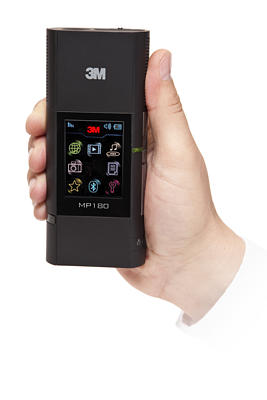
Fourth Gen Pocket Projector From 3M Gets Wireless Touch

Portable projectors from the likes of BenQ and Uniden are beginning to pop out everywhere alongside every other bit of technology going wireless, but 3M is running ahead of the pack with its fourth generation pocket projector.
The PocketProjector MP180, older brother to early models like the MPro110 from back in 2009, is a lightweight projector that fits in the palm of the hand and features Bluetooth and wireless connectivity to store and share files on the go.

The MP180 has improved performance over its predecessors, with a two-hour battery life at 32 lumens, full colour gamut and SVGA resolution. It maxes out at 80 inch projections to fit some of the wider screens.

4GB of internal memory and an additional microSD card port lets users store all their media, presentations, PDFs and documents on the small unit without needing a direct connection to other devices.

This is all controlled via touch screen on the device, or the separate remote.

That being said, the MP180 can still connect to video outputs as well as audio outputs to stream content and to enhance audio beyond the small embedded speakers.

The MP180 PocketProjector will be available from June 1.

Acer Aspirations Point To AMD With New Aspire 5560

Acer is the latest computer maker to spout new notebooks on the back of AMD’s recently announced Fusion A-Series processors.The new addition to the Aspire range is the 5560 – a 15.6 inch notebook enhanced for media consumption with a varying range of connectivity and performance component options starting from a $799 price point.

The Aspire 5560 jumps on top of the latest range of Aspire TimelineX notebooks released earlier this year in April.

The most notable additive to the Aspire series here is the use of AMD’s new Fusion A-Series Accelerated Processing Units, or APUs, just revealed on the Australian market yesterday. These new processors couple with AMD’s graphics processors to deliver performance while reducing power consumption.

The Aspire 5560 model goes all-out with AMD over Intel with a selection of A Series chips from dual to quad core and graphics cards depending on how much consumers are willing to spend.

There’s also the option for up to 8GB of RAM, 750GB of storage, optional Blu-ray and Bluetooth 3.0+ support.


All shipped 5560s include Gigabit LAN, Wi-Fi, 1.3 megapixel webcam, in-built microphone and a range of media-centric  software additives developed by Acer that sit on the rest of the Aspire range.

These include Clear.fi media sharing for sending content across compatible devices sitting in the home network and Dolby Advanced Audio v2 for enhanced sound.

Regional Australia Gets First Dose Of NBN Amid Turnbull Criticism

The push to digitally connect regional Australia has been given a nudge forward as five sites across the country are hooked up to wireless broadband on the back of the NBN roll out.Communications Minister, Senator Stephen Conroy, announced the follow-up on the NBN Co’s earlier June contract with Ericsson to create a 4G fixed wireless network today.

This follow up has seen sites set up in select communities around Ballarat, Victoria; Darwin, NT; Geraldton, WA; Tamworth, NSW and Toowoomba, Queensland, with peak speeds of 12 Mbps per second.

The fledgling roll-out comes amid fresh bouts of criticism from the Federal opposition, with Malcolm Turnbull warning that the NBN would inflate internet prices.

His argument is that monopolisation of the NBN Co’s wholesale of its network would result in anti-competitive pricing for consumers.

Turnbull added that the Coalition would open up existing NBN assets to the private sector for wholesaling if elected.

Under the current plan, the NBN is set to deliver a fibre-optic cable network to 90 per cent of the population within the next decade.

Power-Saving ViewSonic LEDs Go Thin On A Budget

ViewSonic has released a new series of LED-backlit monitors that focus on energy efficiency without breaking the bank.
The 48 Series of monitors comes in 19-, 22- and 24-inch sizes, with the same green tech on board as the recently-released 53 Series from ViewSonic. These power-savers are made to save money on electricity and in the initial purchase.

The budget monitors go for $189, $209 and $249 respectively, while still offering quality visuals. The 24-inch model pushes out Full HD resolution with 300 nits of luminance.

The multi-device screens feature multiple inputs to allow connectivity on a range of devices at once, including a double interface of VGA and DVI-D.

The 53 Series pushes up the price while pushing the size up to 27 inches. The 53 Series includes Full HD monitors with a higher contrast ratio than the 48 Series.

Prices here start at $229, ranging up to $499 for the 27-inch model.

Review: Compro’s Full-Fledged Home & SMB Security Cam System Minus The Expensive Installation

The Compro IP540 takes the small business or home security camera installation and boils it down into a simple camera and software bundle that hands over complete control from anywhere online. It isn’t a holistic security kit, but it does turn a technical operation into a foolproof step-by-step home job without sacrificing important features.Installing the IP540 physically and on the software and networking side is a simple job. The camera is configured and its video software installed at the same time. The CD installation gives a step-by-step guide on setting up the unit wired, wirelessly or through a port switch (but the latter can be little bit finicky for beginners).

Otherwise, the installation is seamless with all the IP memorising and network configuration automatically set up by the software. Wireless requires a hardline to a router and then an additional Wi-Fi dongle attachment which is sold separately.

The camera is mounted with a screw-on plate for ceiling mounting, and the software installation configures the camera for its upside-down view if mounted to a ceiling.

The ComproView software allows up to 32 Compro cams to be linked up to the one hub, with simple but fully functional controls over each feed.

The camera picture itself is completely customisable from the simple yet resourceful software coupled with the camera. Video quality can be tweaked from file types like h.264 for high quality but compressed feeds, MJPEG for mobile streaming and MPEG-4 of various qualities and frame rates.

– Page Break –

Low-light performance is almost brilliant on this cam, bar one hiccup. By default, the camera automatically switches between day and night modes, switching onto infrared (IR) night vision when a room gets dark. This can be disabled in favour of a manual approach.

The low-light performance is great thanks to the IR mode, capturing luminous details across far lengths. This would be a handy feature for capturing outdoor footage at night except that the IR lights on the camera can’t be switched off without turning off the IR mode altogether. What you’re left with when filming out of a closed window at night is a harsh reflection like when taking a conventional flash photo through any reflective surface.

Alerts are (mostly) customisable based on whatever stimuli you set the camera to detect. This event based video recording takes into account things like movement to begin recording video, take snapshots or send alerts to the email or FTP server of choice. Either to save digital storage space if you’re running the camera off an ordinary PC or to be constantly in the know while you’re away, this unit has you covered.

On the downside, there was no function for taking periodic snapshots or videos and having time-stamped files forwarded off, though the option is there to schedule timeframes for the camera to operate.

The customisation extends to the sensitivity of the camera’s detection software. In the control interface (whether you’re looking at it through your browser or on the primary software), a 1-10 level is given to control the sensitivity for stimulus like sound and motion so that, for example, if you don’t want to be sent an alert every time a distant car on the road outside is picked up by the camera, you can simply tune down the sensitivity for motion detection. It’ll require a bit of trial and error though to make sure it’s just right.

– Page Break –

Online control from anywhere, including mobile devices like iPhones, Android phones and Blackberry phones, is the standout feature of this IP camera. A static IP address site is created when you set up the camera with log-in name and password and can be used to access the camera and full controls via web browser. Handily enough, you can also set up a unique iDDNS ‘website’ name for your IP540 so you don’t have to remote the IP address version.

 In the settings, users can toggle more than one feed so that one is optimised for ordinary PC browsing while another, lower quality feed is optimised for viewing on a mobile. Network bandwidth detection finds the appropriate video bit-rate for certain feeds to eliminate the guess work.

The remote controls allow users to move the camera on its 340-degree angle and 100-degree tilt in real time with less than a second delay, and also receive and deliver sound through the two-way microphone and speaker. There is a slight mechanical noise when turning the cam though.

Coupled with a firmware update to support Seedonk instant messenger software, there are multiple other ways to view through the camera’s eye, including through apps on Android and iPhone. The internet control is compatible with all major web browsers with the installation of either a VLC or an Internet Explorer-specific plug-in.

The Compro IP540 takes the small business or home security camera installation and boils it down into a simple camera and software bundle that hands over complete control from anywhere online. It isn’t a holistic security kit, but it does turn a technical operation into a foolproof step-by-step home job without sacrificing important features.

McTiVia Makes Dodgy TV Legal

A wireless streaming device with a twist takes on the world of content delivery, encouraging users to bend the rules to access content cheaply (and most of the time, free) online.

With the McTiVia device from Inspire Technology, users are given a trial version of a Virtual Private Network (VPN) that allows them to access geographically restricted content like videos from Hulu.

Many catch-up TV services in the US restrict content to the one country due to legal licensing restrictions from the content providers. The use of a VPN essentially tricks the services into thinking you are accessing content from the US by going through a foreign IP address.

“Using a VPN service isn’t illegal,” reassures Ivan Knezevic, product manager for the McTiVia.

Inspire Technology have posed the idea of products like their own being used as a simple (and legal) alternative to dodgier methods that otherwise involve piracy.

“This is something that’s a lot easier than downloading a torrent,” adds Knezevic.

The McTiVia wireless streamer is a small box that acts like a home router, connecting computers to televisions. Rather than sharing content through a link that is then played directly on the TV though, the McTiVia mirrors the image you see on your PC onto your TV – effectively turning your TV into your monitor. And wirelessly.


You can already hardline a PC to a TV (and even record from TV to your PC) with the right video card and a few cables, but McTiVia is aimed at a wider consumer audience.

“Convenience” is the key, says Robert Bonanno who heads up marketing for Inspire Technology, the newly founded company that’s distributing the McTiVia in Australia.

With DLNA and other home networking solutions already on the market, Bonanno says that they’re taking a new angle because “DLNA is restricted.”

While most new TVs can play content straight off USBs and via DLNA, the more obscure file types need specifics codecs through a PC to be played. Even new TVs with browsers have flaws in encoding some browser-based video players.

“No hardware on the market, that I know of, currently supports Silverlight [apart from PCs],” says Knezevic, pointing out that websites like Nine’s Fixplay catch-up TV service is only compatible on a PC that can run Microsoft’s Silverlight software.

“They’re trying to make a ‘smart’ TV, but you’ve got the internet which is as smart as it’s ever going to be,” says Bonanno.

“You’ve got a lot of customers who last year bought a three and a half thousand dollar TV – they’re not going to buy a ‘smart’ TV.”


As for the actual running of the device, it sports a 2.4GHz wireless connection that runs as its own router of sorts, connecting PCs and laptops to a connected TV.

It’ll run video content with a three second delay as a buffer for audio and video, ensuring that there’s little to no lag in playback, with an option to run in ‘application’ mode where you physically control your PC on a pixel-to-pixel ratio on the screen, but with lag.

The software supplied is fairly limited though, relying heavily on third party apps to create the truly mobile experience – and continuing the theme of making the dodgy a little more accessible.

“If you’re tech-savvy and jailbreak your phone, you can get a lot more content off your iPhone,” says Bonanno.

Applications like Splashtop can mirror a PC or Mac screen onto iPhones and iPads, which can then control the screen, thus controlling what you see on the TV through the McTiVia.

The McTiVia is currently out at Harvey Norman retailers for $299, though Inspire Technology is in talks with other retailers like Officeworks on widening the distribution network.

Part of moving to other retailers like Officeworks is to grab the office/business market with office applications like presentations from PC to TV.

They’re also working on bringing a QWERTY-keyboard remote control with point-and-click cursor functions to take over the need for a mouse and keyboard when using a PC on a TV. This should hit stores in the next month or two for around $99.